

Real-time applications powered by large language models (LLMs) demand speed. Delays in response - anything over 400-800ms - can frustrate users, making latency optimization critical. Here’s how to tackle it:
-
Key Metrics : Focus on Time to First Token (TTFT) and Inter-Token Latency (ITL). TTFT shapes first impressions, while ITL ensures smooth text flow.
-
Challenges : Long prompts, static batching, and sequential token generation create bottlenecks. High traffic can push latencies to unacceptable levels.
-
Solutions :
-
Use vLLMwith PagedAttention for memory efficiency and continuous batching to maximize GPU utilization.
-
Speculative decoding speeds up token generation by using a smaller draft model for initial predictions.
-
Implement semantic caching to reuse responses for similar queries, cutting LLM calls and saving time.
-
Apply quantization (e.g., FP8, INT8) to reduce memory demands and boost throughput.
-
Leverage tensor parallelism to split workloads across GPUs for larger models.
-
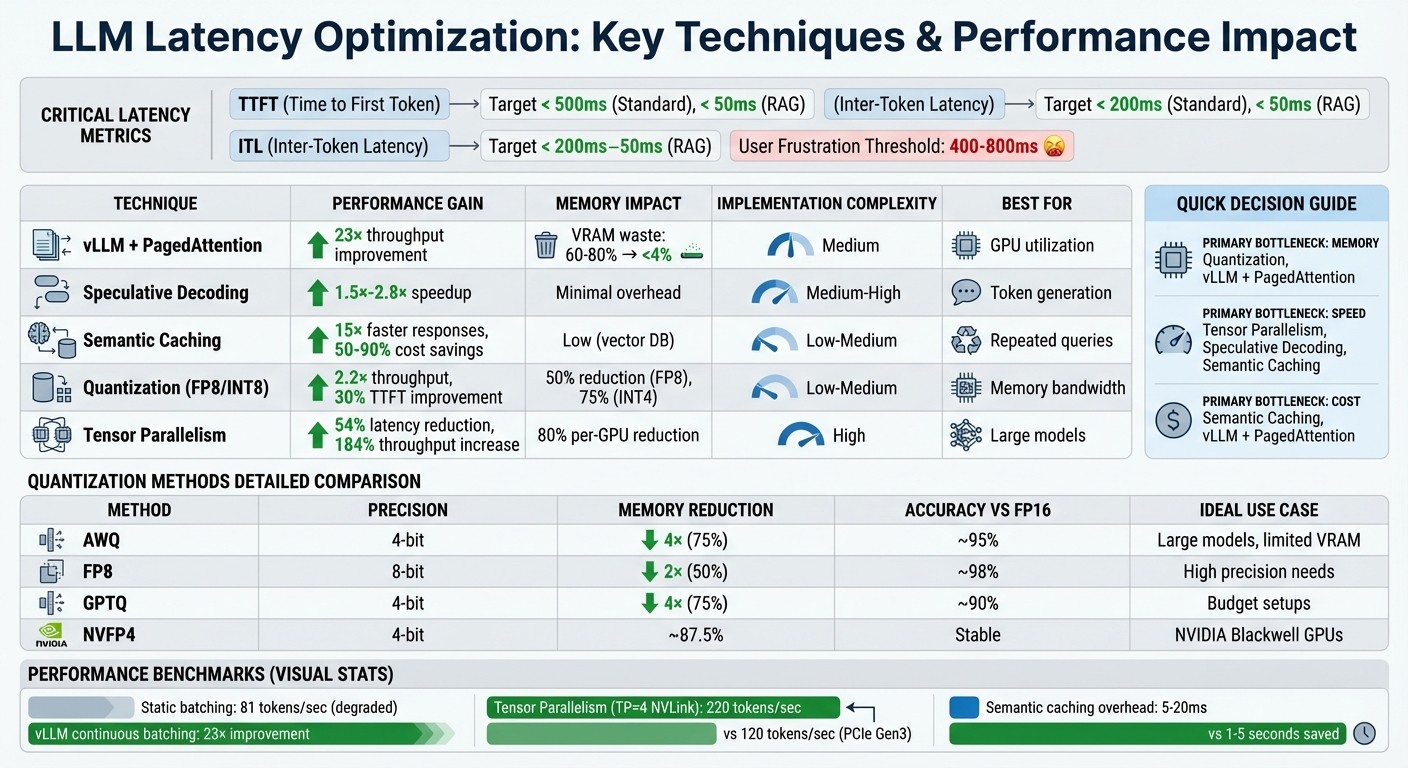
LLM Latency Optimization Techniques: Performance Metrics and Impact Comparison
Techniques for Reducing LLM Inference Latency
Continuous Batching and PagedAttention with vLLM

Static batching often leaves GPUs underutilized, as they sit idle until all sequences in a batch are processed. Continuous batching addresses this by allowing new requests to join as soon as any sequence completes an iteration, ensuring better use of resources.
vLLM takes this a step further with PagedAttention , a system inspired by how virtual memory operates in operating systems. Instead of storing the key-value cache in one large block, PagedAttention divides it into fixed 16-token blocks in non-contiguous GPU memory. This approach significantly reduces VRAM waste - dropping it from 60–80% to under 4%.
In June 2023, engineers at Anyscale showcased the power of vLLM when paired with continuous batching. Running a Meta OPT-13B model on a single NVIDIA A100 40GB GPU, they achieved a 23× throughput improvement compared to naive static batching. Meanwhile, static batching performance plummeted to just 81 tokens per second as sequence variance increased.
“vLLM exists almost entirely to fix this: VRAM runs out much earlier than expected, batching stops scaling, and latency becomes unpredictable.” – Andrey Krisanov, Software Engineer
For real-time streaming, vLLM now supports incremental processing of inputs, making it ideal for tasks like streaming audio or video frames without waiting for the entire request to complete. Getting started is simple:
-
Install vLLM using:
pip install vllm -
Launch an OpenAI-compatible server with:
python -m vllm.entrypoints.openai.api_server --model <model_path>
You can tweak memory usage with the --gpu-memory-utilization flag (default is 0.9) and enable CUDA graphs for smaller batch sizes to cut CPU overhead.
Beyond batching, speculative decoding further speeds up token generation.
Speculative Decoding for Faster Token Generation
Token generation in LLMs is typically sequential, which introduces delays. Speculative decoding changes this by using a smaller draft model to predict multiple tokens at once. These predictions are then validated in parallel by the larger target model, effectively halving or even tripling the speed of inter-token generation.
The process involves rejection sampling, where the target model compares its probability distribution against the draft’s predictions. Incorrect guesses are replaced with the correct tokens, ensuring accuracy without sacrificing speed.
Benchmarks show vLLM achieving a 1.5× speedup on the ShareGPT dataset using this method and up to a 2.8× speedup on summarization tasks with prompt lookup decoding. However, for this to work efficiently, the draft and target models must use the same vocabulary and tokenizer to avoid costly conversions.
For lighter workloads, alternatives like N-gram matching or MLP speculators can be used. N-gram matching identifies patterns in prompts or previously generated text without extra VRAM, while MLP speculators - smaller prediction heads - reuse internal feature maps to predict tokens.
While decoding focuses on speed, semantic caching tackles efficiency for repeated queries.
Semantic Caching for Repeated Queries
Handling similar queries repeatedly can be inefficient. Semantic caching optimizes this by converting queries into vector embeddings and storing them alongside their responses in a vector database.
When a new query arrives, the system calculates cosine similarity between its embedding and those in the cache. If the similarity score exceeds a threshold (typically 0.85–0.95), the cached response is returned. This process adds only 5–20 milliseconds for the vector search but can save 1–5 seconds by skipping an LLM call.
Many production systems use a two-layer approach: an exact hash lookup for identical queries, followed by a semantic similarity search for paraphrased ones. Popular backends include Redis, Qdrant, Pinecone, and pgvector (PostgreSQL).
The cost savings are substantial. Teams report cutting LLM API expenses by 50% or more, with some achieving up to 90% savings on input tokens. In chatbot applications, semantic caching has delivered responses up to 15× faster than standard LLM inference.
To implement this effectively:
-
Start with a similarity threshold of 0.90–0.95, adjusting based on false positive rates (3–5% is acceptable).
-
Set the cache’s Time-to-Live (TTL) based on how often the data changes - 5–15 minutes for dynamic content like prices, and up to 24 hours for static information like FAQs.
“Semantic caching acts as an intelligent layer between the user and the model - reusing meaningful results, cutting down LLM calls, and improving response times dramatically.” – Kostiantyn Ivanov
Memory Optimization Methods for LLM Deployments
After tackling inference latency with batching and decoding improvements, optimizing memory usage takes real-time performance to the next level.
Quantization to Reduce Memory Bandwidth
Quantization works by converting 16-bit floats to lower-precision formats like 8-bit or 4-bit integers, significantly reducing model size. For instance, a 7B-parameter model that typically requires 14 GB of VRAM in FP16 can shrink to just 4 GB in INT4. This reduction eases memory bandwidth demands, a common bottleneck in streaming scenarios. NVIDIA H100 GPUs, capable of running FP8 operations as fast as INT8, can boost throughput by up to 2.2× for models like Llama2-70B compared to FP16.
In 2025, Databricks successfully quantized the Llama2-70B-Chat model to FP8 using NVIDIA TensorRT-LLM. The results? A model that was 50% smaller, delivered 2.2× higher throughput, and improved time-to-first-token by 30%. A Databricks engineer highlighted the core advantage:
“Quantization’s greatest benefit is that it unlocks higher concurrency, because it allows us to double the maximum batch size that can fit on the same hardware while maintaining the same latency budget.”
Quantizing the Key-Value (KV) cache to INT8 or FP8 further reduces persistent memory usage, enabling 2–3× larger batch sizes and increased concurrency for streaming workflows. Interestingly, FP8 often outperforms INT8 because its non-uniform distribution better captures the bell curve and outliers typical of model weights. These memory savings directly reduce inference latency in streaming applications.
Here’s a quick comparison of common quantization methods:
| Method | Precision | Memory Reduction | Accuracy Impact | Best Use Case |
|---|---|---|---|---|
| AWQ | 4-bit | 4× reduction | ~95% of FP16 | Large models on limited VRAM |
| FP8 | 8-bit | 2× reduction | ~98% of FP16 | Scenarios requiring high precision |
| GPTQ | 4-bit | 4× reduction | ~90% of FP16 | Budget-constrained setups |
| NVFP4 | 4-bit | ~87.5% reduction | Stable recovery | NVIDIA Blackwell GPUs |
To implement quantization effectively, use a calibration dataset of 128–512 representative samples to determine scaling factors. Apply per-layer quantization algorithms, which rely on gradient-based sensitivity scores, to identify layers that can be compressed without significant accuracy loss.
Tensor Parallelism Across Multiple GPUs
Tensor parallelism complements quantization by distributing a model’s workload across multiple GPUs, enabling efficient handling of larger models.
This approach splits a model’s weight matrices across GPUs, allowing each device to manage part of the computation. By pooling the VRAM of all GPUs, tensor parallelism makes it possible to run massive models - like Llama-70B - that would otherwise exceed the capacity of a single GPU. This method can cut per-GPU memory requirements by up to 80%.
However, synchronization between GPUs is required after each layer, achieved through AllReduce operations using NVIDIA’s NCCL backend. This makes interconnect speed critical. For example, a TP=4 setup on NVLink achieved 220 tokens per second - nearly double the 120 tokens per second on a PCIe Gen3 connection - with interconnect overheads ranging from 10% to 30%. Note that duplicating the KV cache across TP ranks adds about 20% extra memory usage. Techniques like PagedAttention can lower KV memory fragmentation from around 70% to under 4%.
In 2025, Perplexity AI upgraded to NVIDIA H100 GPUs, slashing latency by 54% and increasing throughput by 184%. Adding FP8 optimization further reduced latency by 49% and boosted throughput by 202%.
Rajvir Singh from NVIDIA emphasized:
“The trade-off between throughput and latency is driven by the number of concurrent requests and the latency budget, both determined by the application’s use case.”
When setting up tensor parallelism, ensure that the --tensor-parallel-size parameter matches your GPU count and divides evenly into the model’s number of attention heads (e.g., TP=4 for a model with 32 heads). To avoid errors, verify GPU topology and high-speed interconnect paths using tools like nvidia-smi topo -m. If out-of-memory issues arise, consider reducing --gpu-memory-utilization (e.g., to 0.85) or applying additional quantization.
Monitoring and Improving Latency with Latitude
Once you’ve implemented optimizations like quantization and tensor parallelism, the next step is tracking how these changes perform in production. Latitude offers tools to monitor latency metrics, gather feedback, and fine-tune large language model (LLM) applications over time.
Tracking TTFT and ITL in Production
Latitude operates as an AI Gateway , automatically capturing performance metrics without requiring extra setup. It tracks key metrics like Time to First Token (TTFT) and Inter-Token Latency (ITL) through Server-Sent Events (SSE) such as provider-started and provider-completed. These events also provide detailed token usage data, including breakdowns for prompt, completion, and total tokens.
Using visual tracing , Latitude maps out the full journey of a request, highlighting where latency issues arise - whether it’s in prompt templating, model invocation, tool execution, or retrieval steps. By focusing on p95 and p99 metrics , teams can identify worst-case scenarios and set up real-time alerts for anomalies like token usage spikes or latency irregularities. This helps catch problems such as infinite reasoning loops or stalled responses before they affect users.
| Metric | What It Measures | Target for Real-Time Apps |
|---|---|---|
| TTFT | Time to First Token (responsiveness) | < 500ms (Standard), < 50ms (RAG) |
| ITL | Inter-Token Latency (smoothness) | < 200ms (Standard), < 50ms (RAG) |
| TPOT | Time per Output Token (generation speed) | ~100ms per token |
| TPS | Tokens Per Second (throughput) | Varies by hardware (e.g., 100-300 for Inf2) |
These insights can guide adjustments to prompts and evaluation strategies to improve latency while maintaining performance.
Collecting Feedback and Running Evaluations
Monitoring metrics is just the start - turning those metrics into actionable feedback is key to continuous improvement.
Latitude’s Batch Mode allows teams to run regression tests on prompt changes using golden datasets. By comparing different prompt versions through A/B testing, you can ensure that latency improvements don’t compromise the model’s overall performance.
The platform also supports live evaluations , which analyze production logs in real time. Automated evaluation rules monitor metrics like safety and helpfulness, flagging issues such as performance drift or degradation early in the process. Latitude’s Prompt Suggestions feature uses these evaluations to offer data-driven recommendations for improving prompt performance.
Refining Prompts and Models Over Time
Insights from production monitoring can be used to refine prompts and models, ensuring they maintain low latency and high efficiency.
Latitude’s shared workspaces and PromptL syntax enable teams to collaborate on prompt versioning, experiments, and rollbacks. By using dynamic variables and logic, you can keep prompts concise, reducing token usage and improving latency.
To further enhance user experience, consider implementing response streaming through Latitude’s SSE support. This approach delivers text incrementally, reducing perceived latency (TTFT) even if the overall generation time remains unchanged. Additionally, automated optimization loops can use evaluation scores to refine prompts continuously, removing the need for manual adjustments. Always test updates against your golden dataset to avoid introducing new latency issues while refining your system.
Conclusion: Building Low-Latency LLM Systems
Summary of Latency Optimization Techniques
To achieve low-latency in large language model (LLM) systems, a layered approach is key, tackling bottlenecks across the entire inference pipeline. Strategies like continuous batching with PagedAttention address memory fragmentation by managing the KV cache as virtual memory. This allows new requests to join active batches at the iteration level, keeping the system efficient. Meanwhile, speculative decoding speeds up token generation by 2×–3×, as a draft model predicts tokens in parallel, followed by quick single-pass verification.
For real-time streaming, semantic caching drastically reduces response times - from seconds to milliseconds - by using vector embeddings to recognize similar queries (e.g., “Reset password” vs. “Change password”) and serving precomputed responses. Memory usage and throughput also see improvements with techniques like quantization (INT8/FP8) and tensor parallelism , which distribute workloads across multiple GPUs without sacrificing performance.
Ongoing performance monitoring is crucial. Tools like Latitude track metrics such as time to first token (TTFT) and inference token latency (ITL) , enabling continuous evaluations of prompt changes. This feedback loop ensures models stay optimized as user behavior evolves, all while maintaining quality. With these methods in place, the field is poised for further advancements in latency reduction.
Emerging Trends in LLM Latency Optimization
The latest innovations are pushing the boundaries of latency optimization. Disaggregated architectures now separate prefill and decode phases onto specialized clusters, improving efficiency. Another breakthrough is streaming input support , introduced in January 2026, which allows models to process audio and video incrementally via WebSocket APIs. This real-time processing eliminates the need to wait for full prompts, transforming how voice assistants and robotics handle live data.
Other advancements include zero reload sleep mode , which keeps the CUDA state active while freeing GPU memory during idle periods. Meanwhile, self-speculative decoding methods like SWIFT adaptively skip intermediate layers based on token confidence, removing the need for separate draft models. Additionally, FP8 KV-cache quantization cuts memory usage in half, doubling concurrency without significant precision loss. These trends are rapidly transitioning from research to production, addressing the same latency challenges that initially drove the push for real-time optimization in LLM systems.
FAQs
What should I optimize first: TTFT or ITL?
Optimizing TTFT (Time to First Token) should be your top priority. Why? Because it directly affects how responsive real-time LLM applications feel to users. A quicker TTFT means users get the first bits of output faster, creating a more immediate and fluid interaction. This can make the overall experience feel much more natural and engaging.
How should I decide between vLLM batching, speculative decoding, and caching?
Your choice boils down to your performance goals and the type of workload you’re handling:
-
vLLM batching : Combines multiple requests into one process to boost throughput, making it perfect for handling heavy traffic.
-
Speculative decoding : Leverages faster models to predict outcomes, ideal for tasks demanding minimal delays, such as chatbots.
-
Caching : Stores and reuses results for repeated prompts, cutting down on unnecessary computations.
If maximizing throughput is your priority, go with batching. For tasks where speed is critical, speculative decoding is the way to go. Caching works well alongside both methods to enhance efficiency.
When does quantization hurt quality too much for streaming apps?
Quantization plays a critical role in determining the quality of streaming apps, especially when reducing precision causes accuracy to drop beyond acceptable limits. This issue is particularly pronounced with extremely low-bit formats like 4-bit or less. While these formats can shrink model sizes and enhance processing speed, the downside is often a significant loss in output quality. For real-time applications, this trade-off can render such formats impractical.