

Runninglarge language modelsis expensive, but quantization can save up to 75% in memory usage while keeping quality almost intact. Here’s what you need to know:
-
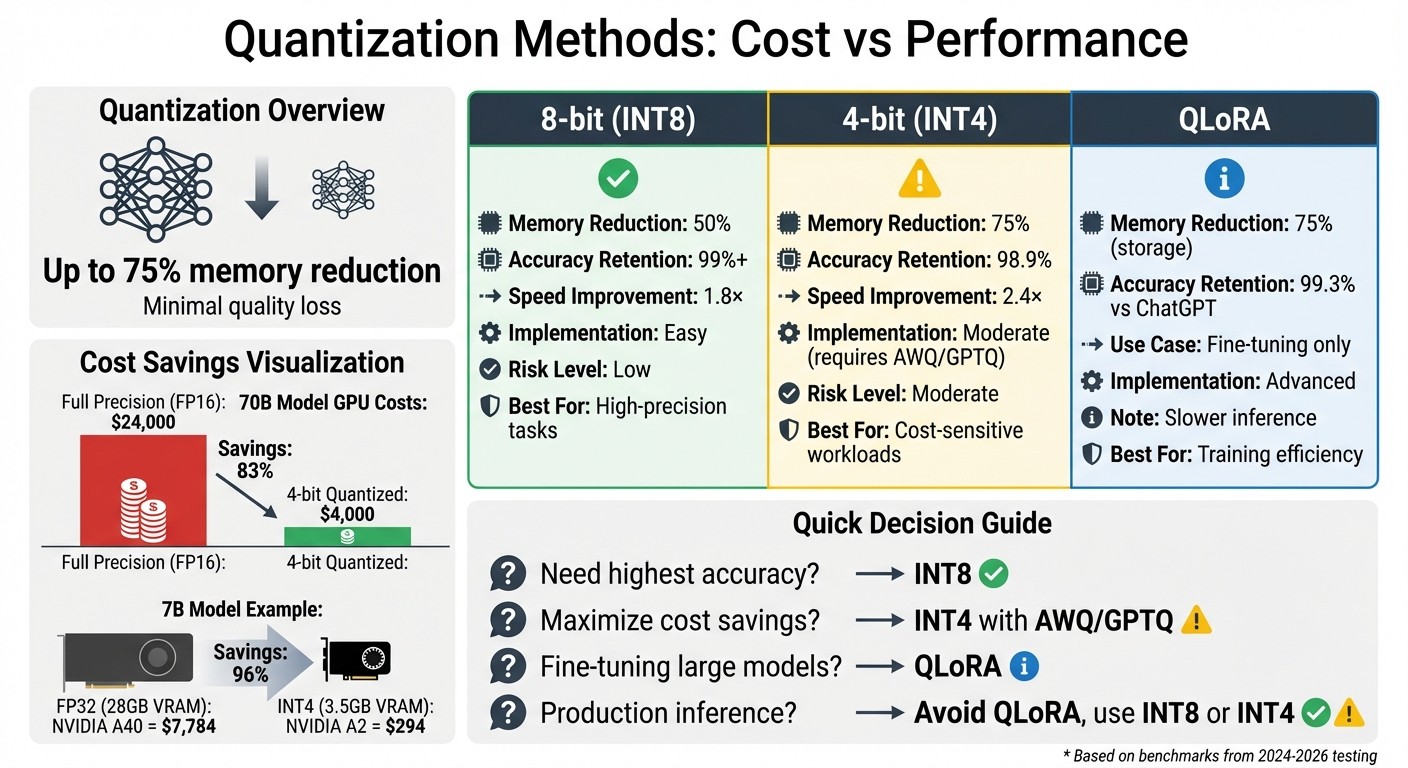
8-bit quantization reduces memory by 50% with minimal quality loss (~1%) and is easy to implement.
-
4-bit quantization cuts memory by 75%, but requires advanced techniques like AWQ or GPTQ for better accuracy (98.9% recovery).
-
Cost savings are massive: A 70B model’s GPU costs can drop from $24,000 to $4,000 with 4-bit quantization.
-
QLoRA makes fine-tuning efficient by combining 4-bit storage with 16-bit adapters, but slows down inference.
-
For production, INT8 is ideal for high accuracy, while INT4 works for simpler tasks.
Key takeaway: Quantization slashes costs and boosts efficiency, but the right method depends on your workload and precision needs.
LLM Quantization Methods: Cost Savings and Performance Comparison
Quantization Techniques and Methods
8-bit Quantization
8-bit quantization provides a straightforward way to cut costs without affecting quality. By reducing model size by about 4× compared to FP32, it maintains nearly the same performance, with less than a 1% drop in accuracy. The best part? It’s easy to implement, requiring only minor code changes. This makes it an excellent starting point for teams new to quantization, offering a low-to-moderate risk option.
The method strikes a great balance between speed and accuracy, with minimal validation effort needed. But for those looking to push compression further, 4-bit quantization offers a more aggressive approach - albeit with some trade-offs.
4-bit Quantization
4-bit quantization can compress models by up to 75% compared to FP16 , but it does come with higher implementation challenges. Without proper calibration or advanced techniques like AWQ (Activation-Aware Weight Quantization), GPTQ (error-aware rounding), or AutoRound (learned rounding), accuracy may drop by 2–5%.
In January 2026, Madani Badaoui benchmarked Mistral-7B-Instruct-v0.2 using llama.cpp on an Apple M1 Pro. The Q4_K_M (4-bit) configuration reduced the model’s size from 7.2 GB to 4.1 GB - a 43.1% reduction - while the quality loss in perplexity was just 0.51%, almost negligible. However, pushing further to 2-bit (Q2_K) resulted in a steep accuracy drop of 7.94%, a “quality cliff”. This makes 4-bit a practical option for production, whereas 2-bit remains risky.
Performance with 4-bit quantization also depends on optimized CUDA kernels like Marlin or Triton. Without these, 4-bit models may face slower inference speeds compared to 8-bit or FP16 models due to dequantization overhead. For example, in May 2024, Mike Tong, a Senior ML Engineer at Legion, demonstrated that a 70B parameter model could run on GPUs costing around $4,000 (using AWQ quantization), a significant reduction compared to the $24,000 required for full precision. Calibration further improved response similarity by 10% compared to standard quantization methods.
This combination of compression and manageable quality trade-offs makes 4-bit quantization a cost-effective choice for production. Building on this, let’s look at QLoRA, which extends these benefits to fine-tuning.
QLoRA
QLoRA (Quantized LoRA) enables fine-tuning of large models by storing the base model in 4-bit precision while training low-rank adapters in 16-bit precision. It uses 4-bit NormalFloat (NF4), a data type designed to align with the normal distribution of neural network weights, reducing information loss compared to standard 4-bit integers. Double Quantization further optimizes memory use by compressing the quantization constants themselves, cutting metadata overhead from 0.5 bits per parameter to about 0.127 bits.
In May 2023, researchers at the University of Washington, led by Tim Dettmers, introduced the Guanaco model family. Using QLoRA, they fine-tuned a 65B parameter model on a single NVIDIA A100 (48GB) in less than 24 hours. The resulting model achieved 99.3% of ChatGPT’s performance on the Vicuna benchmark, showing that 4-bit fine-tuning can deliver high-quality results without compromise.
While QLoRA improves training efficiency, it slows down inference due to the constant need for weight dequantization. As Sauradeep Debnath, an ML Lead, explained:
“The only benefit brought by QLoRA is the reduced memory cost for fine-tuning”.
For production inference, it’s better to migrate QLoRA-tuned models to formats like AWQ or GPTQ, which leverage optimized kernels for faster throughput. This strategy ensures cost savings during training while maintaining performance efficiency in deployment.
Models Tested
We evaluated five leading LLMs to understand how quantization impacts their performance in practical scenarios. Each model demonstrated unique strengths and challenges when compressed, offering valuable insights for production deployment. Here’s how each model performed in terms of quantization and cost efficiency.
Llama 3.1 8B Instruct
Llama 3.1 8B Instruct preserved high accuracy post-quantization. At 8-bit, it retained over 99% of its original accuracy, and even at 4-bit, it achieved 98.9% accuracy in coding tasks. On MMLU benchmarks, accuracy fluctuated by about ±1%.
Quantization significantly reduces its size: 8-bit compression cuts it from 16 GB to 8 GB, while 4-bit shrinks it to around 4 GB. On an NVIDIA RTX 4070, the 4-bit version processes about 68 tokens per second, making it suitable for edge devices and local inference on consumer GPUs.
However, smaller models like this 8B variant struggle with complex reasoning tasks. For instance, on benchmarks such as GPQA, performance sometimes approaches random guessing, highlighting its limitations in advanced logical reasoning.
Llama 3.3 70B
The 70B variant, while delivering exceptional performance at full precision, is more sensitive to quantization. Llama 3.3 70B experienced a noticeable 7.8-point drop on the MMLU benchmark when reduced to 4-bit. This degradation contrasts with the resilience of smaller models like the 8B version.
Despite this sensitivity, it still operates efficiently when optimized. On an RTX 4090, the 4-bit version processes 113 tokens per second. For production, using formats like GPTQ-INT8 or Q5_K_M is recommended to balance performance and efficiency.
Qwen2.5-VL-7B-Instruct
The Qwen2.5 series maintained 95–98% accuracy on benchmarks like GSM8K and IFEval at 4-bit or 5-bit compression levels. This makes it a cost-effective option for production scenarios where aggressive compression is necessary.
The 7B variant operates at 60–65 tokens per second on an M1 Max using 4-bit MLX quantization. However, for multilingual academic tasks like C-Eval, 4-bit quantization can lead to a 15–20% accuracy loss. This calls for careful testing in multilingual applications.
THUDM GLM-4-9B-0414
GLM-4-9B-0414 excels in tasks requiring structured outputs, such as function calling and code generation. When optimized for hardware like NVIDIA’s Blackwell platform, it delivers strong efficiency for enterprise applications focused on API interactions and multi-agent setups.
DeepSeek V3.2

DeepSeek V3.2 showed remarkable stability, with less than a 1% accuracy difference between full precision (BF16) and Q4_K_M formats across benchmarks like MATH, GPQA, and MMLU. Its distilled 32B variant is particularly appealing for teams prioritizing cost-effective solutions for reasoning-heavy tasks.
This model benefits from advanced inference optimizations, offering high-quality performance with a low cost per 1 million tokens. Its balance of accuracy retention and affordability makes it a strong contender for large-scale deployments where both quality and budget are key considerations.
These findings provide a foundation for deeper analysis of cost-saving strategies and performance metrics.
Cost and Performance Results
Quantization can drastically cut costs. For example, a 70B model’s GPU hardware expenses drop from about $24,000 at full precision to just $4,000 using 4-bit quantization. Similarly, cloud inference costs for the same model shrink by more than 60%, going from $18,000 to under $7,000 per month. Below, we break down the cost savings, performance metrics, and the balance between quality and cost.
Cost Savings Analysis
The bigger the model, the more pronounced the savings. A 7B model at full precision (requiring 28 GB of VRAM) runs on an NVIDIA A40 GPU, which costs $7,784. However, when quantized to INT4 (using just 3.5 GB of VRAM), the same model can run on an NVIDIA A2 GPU for only $294. Here’s a quick comparison:
| Precision | VRAM Required | Recommended GPU | Estimated Cost |
|---|---|---|---|
| FP32 (Full) | 28 GB | NVIDIA A40 | $7,784 |
| INT4 (Quantized) | 3.5 GB | NVIDIA A2 | $294 |
Quantization not only compresses models but also boosts processing speeds. 4-bit quantization achieves a 3.5× compression and accelerates single-stream processing by 2.4×. Meanwhile, 8-bit quantization achieves a 2× compression ratio and improves multi-request server performance by 1.8× on average.
The trend toward cost-efficient quantized models is reflected in pricing shifts. Models like Grok 4.1 Fast ($0.20 per 1M tokens) and DeepSeek V3.2 ($0.28 per 1M tokens) are up to 12× cheaper than GPT-3.5 while maintaining similar accuracy levels. These savings highlight the growing adoption of quantization in the industry.
With hardware costs addressed, let’s dive into how these savings impact performance.
Performance Metrics
Performance evaluations conducted in October 2024 reveal that 8-bit quantized models retain 99.9% of the accuracy of their full-precision counterparts, while 4-bit models maintain about 98.9% on benchmarks like HumanEval+. For instance, Llama 3.1 8B demonstrated accuracy within ±1 percentage point of its FP16 baseline on MMLU and ARC-Challenge benchmarks when quantized to 4-bit. The larger Llama 3.1 405B even fully recovered its accuracy at FP8 across diverse benchmarks.
Quantization also unlocks better throughput. On NVIDIA H100 GPUs, FP8 precision processes 2.2× more tokens per second than FP16, thanks to larger batch sizes. However, going below 4-bit precision significantly impacts quality. As researcher Eldar Kurtić explains:
“FP8 weight and activation quantization (W8A8-FP) is lossless across all model scales”.
Quality-to-Cost Ratio
For production use, 4-bit quantization hits the sweet spot. Techniques like Q4_K_M or GPTQ-INT4 retain about 99% of the model’s performance while slashing costs by over 60%. A 4-bit 70B model can even outperform a full-precision 13B model while using the same memory footprint. As tech strategist Tonny Higgins notes:
“A well-quantized large model often beats a smaller full-precision model of the same memory footprint”.
Efficiency drops sharply below 4-bit, with 4-bit precision being 11× more efficient than 2-bit for size reduction relative to quality loss. For applications where accuracy is critical, 8-bit quantization (INT8 or FP8) offers near-lossless quality while doubling processing speeds. Fine-tuning during quantization can further improve similarity to the original model by 1% to 10%, making it a worthwhile step for specialized tasks.
Key Takeaways for Production Teams
Building on the quantization performance findings, here are some practical tips for production teams to optimize operations.
Cost Reduction Strategies
To achieve 40–60% cost savings , start by optimizing your infrastructure. Check VRAM usage during peak loads using tools like nvidia-smi. If usage is consistently below 70%, consider downgrading GPUs or consolidating more models per instance to reduce expenses.
Choosing the right hardware is another major factor. For example, an RTX 4090 provides 83 TFLOPS for $0.49 per hour, compared to an A100 40GB’s 19.5 TFLOPS at $3.67 per hour. If your workload fits within 24 GB of VRAM, consumer-grade GPUs can deliver up to 7× the cost efficiency of datacenter GPUs. By quantizing a 70B model from FP16 to INT4, you can run it on two RTX 4090s (48 GB total) instead of two A100 80GB GPUs, potentially saving over $4,500 per month.
In-flight batching can also make a huge difference. It can raise throughput for a Llama 70B model from 15 tokens per second to over 200 , increasing efficiency by 5–10× and cutting per-request costs by up to 80%. Be cautious of hidden fees, though. Charges for data egress, storage, and load balancers from major cloud providers can add a 30–50% premium on top of base GPU costs.
Maintaining Model Quality
When working on tasks that require high precision, like code generation or mathematical reasoning, use INT8 quantization to limit quality loss to just 2–5%.
For most general production workloads, the Q4_K_M 4-bit format offers a solid balance between efficiency and performance. To simplify deployments, consider Activation-aware Weight Quantization (AWQ). This method delivers fast 4-bit performance and is supported by robust frameworks, making it a practical choice for production.
Using Latitude for Observability
Operational observability is just as crucial as cost and quality. Quantized models can behave unpredictably, so monitoring their performance is essential. Latitude’s structured workflow helps by capturing execution metadata, performance metrics, and running batch tests with human quality reviews to catch potential issues early.
When switching between model versions or adjusting precision levels, Latitude’s AI Gateway ensures smooth API endpoint management. Meanwhile, the Prompt Manager handles versioning and fine-tuning prompts tailored to lower-precision models. This continuous feedback loop - tracking model behavior, incorporating expert insights, running evaluations, and iterating - helps keep quantized LLMs reliable as your product scales.
Conclusion
Our tests show that model quantization reliably delivers both cost savings and strong performance in production settings. 8-bit quantization stands out as the best option for most use cases - it reduces memory usage by 50%, speeds up inference by 1.8×, and retains over 99% accuracy on demanding benchmarks like HumanEval. For teams working with models such as Mistral 7B, switching to FP8 can lower VRAM requirements from 16 GB to just 7 GB, while cutting costs per million tokens by 24%.
W8A8-INT quantization compresses model size by 2× with minimal quality trade-offs, while W4A16 achieves 3.5× compression and a 2.4× speed boost. However, 4-bit quantization comes with a 2–15% drop in quality, making it a better fit for high-throughput, low-stakes tasks where precision isn’t as critical. Choosing the right quantization method for your workload is key to balancing efficiency with performance.
For general workloads, INT8 should be the default, with 4-bit methods reserved for simpler tasks like classification or summarization. Hardware compatibility also matters - use W8A8-FP for NVIDIA H100 GPUs and W8A8-INT for older A100 systems.
Latitude’s observability tools help ensure these optimizations remain effective as deployments scale. By monitoring quantized model behavior, running batch evaluations with human feedback, and fine-tuning prompts for lower-precision models, teams can maintain high-quality outputs.
Start with 8-bit quantization as your baseline, then fine-tune based on performance data. You’ll see immediate cost reductions without sacrificing quality, as long as the process is carefully monitored.
FAQs
How do I choose INT8 vs INT4 for my workload?
Choosing between INT8 and INT4 boils down to finding the right mix of performance, memory savings, and how much accuracy loss you can tolerate.
-
INT8 cuts memory usage by about 50%, typically with only a small drop in quality (around 2-5%). It also boosts speed by 1.5-2x, making it a great option for production environments where both efficiency and accuracy matter.
-
On the other hand, INT4 achieves even greater compression, reducing memory usage by roughly 75% and delivering faster inference speeds (up to 2.4x). However, this comes at the cost of a more noticeable quality drop (10-15%), making it a better fit for scenarios where efficiency takes priority over precision.
Will 4-bit quantization make my model slower in production?
Quantizing models to 4-bit precision is a smart way to shrink their size and speed up inference, all while keeping production workflows running smoothly. Techniques like AWQ and AutoRound take this a step further by leveraging GPU-native kernels. This ensures that even with reduced precision, performance remains efficient and reliable.
After QLoRA fine-tuning, what format should I deploy?
After fine-tuning with QLoRA , deploy the model in a 4-bit quantized format while keeping the base model weights intact. QLoRA integrates LoRA with quantized linear layers, allowing for efficient deployment without sacrificing performance.