

Preprocessing data is the backbone of effective prompt engineering. Without it, large language models (LLMs) can misinterpret inputs, leading to errors like hallucinations or biases. Here’s a quick breakdown of how to properly prepare data for optimal LLM performance:
-
Assess Data Quality : Identify issues like missing values, duplicates, or irrelevant content. Problems like target leakage or disguised placeholders (e.g., “-999”) can derail results.
-
Clean and Standardize : Remove noise (e.g., URLs, special characters) and ensure consistent formatting. Use lemmatization for accuracy and Unicode normalization to avoid encoding errors.
-
Tokenize and Format : Break text into manageable tokens that fit within the model’s context window. Use the correct tokenizer for your LLM and structure prompts with clear roles and delimiters.
-
Validate Data : Test and monitor preprocessed data using tools like Latitude to catch errors and ensure consistency.
Proper preprocessing ensures your data is clear, structured, and aligned with LLM constraints, boosting accuracy and reducing token costs. Let’s dive into the details.
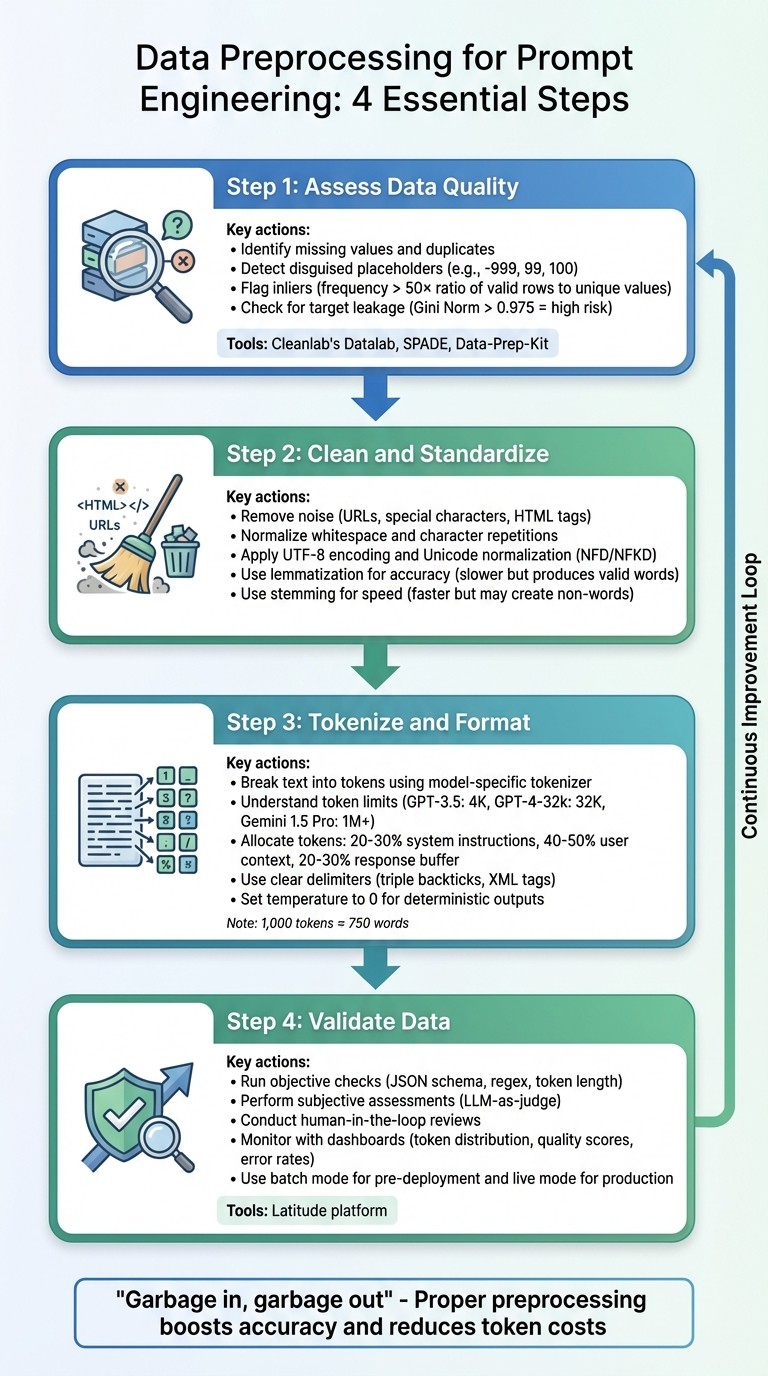
4-Step Data Preprocessing Workflow for Prompt Engineering
Assess Data Quality and Identify Issues
Before diving into cleaning or formatting data, it’s crucial to understand what you’re working with. Carefully examining raw data helps uncover issues that could derail prompt engineering efforts. The saying “Garbage in, garbage out” serves as a reminder of why assessing data quality is so important.
Below are some common data quality problems that can affect prompt engineering.
Common Data Quality Issues in Prompt Engineering
Data quality problems can be sneaky. For instance, disguised missing values often slip through unnoticed. Older systems might use placeholders like “-999”, “99”, or “100” to represent missing data. If these placeholders aren’t recognized and addressed, they could distort your model’s results by being treated as legitimate data points.
Another issue is inliers - values that appear normal but occur with unusual frequency. An inlier can be flagged if its frequency surpasses 50 times the ratio of valid rows to unique values. A classic example is “55555” being used as a placeholder zip code. It looks fine on the surface, but it’s just noise.
Target leakage is a particularly tricky problem that can inflate a model’s performance during testing but cause it to fail in real-world scenarios. This happens when training data includes information that wouldn’t be available during prediction. For instance, target leakage is flagged as high risk if a feature’s importance score (Gini Norm) exceeds 0.975.
A historical example of data mismanagement comes from the 1980s. NASA’s software automatically discarded very low ozone readings as “nonsensical outliers.” This oversight delayed the discovery of the seasonal ozone hole until the British Antarctic Survey uncovered it in 1985. It’s a cautionary tale about the cost of ignoring data quality.
Prompt engineering also requires vigilance against irrelevant content, duplicate entries, and insufficient data variety. Be on the lookout for patterns hinting at human error, like numbers rounded to 0 or 5, and ensure categorical fields only contain valid values.
Tools and Techniques for Assessing Data Quality
After identifying potential issues, you can use various tools to systematically assess and improve data quality.
-
Cleanlab’s Datalab : This tool uses model-predicted probabilities and feature embeddings to detect label issues, outliers, and near-duplicate entries. For example, in a test involving 1,000 customer service requests, it flagged 42 potential label errors and 38 outlier issues.
-
Data-Prep-Kit(DPK) : An open-source toolkit that scales from local environments to large clusters with thousands of CPU cores. It has been used in preparing data for IBM’s Granite Models and is tailored for large language model (LLM) development.
-
SPADE : This tool synthesizes data quality assertions based on the history of prompt versions. It has been applied to over 2,000 pipelines, reducing false failures by 21% compared to simpler methods.
For text-specific challenges, raw text can be converted into vector embeddings using pretrained transformers like electra-small-discriminator. This helps identify near-duplicate prompts and out-of-distribution noise that might evade basic keyword filtering. To avoid overfitting when checking for label errors, use out-of-sample predicted probabilities through cross-validation.
A thorough assessment of data quality lays the groundwork for effective cleaning, standardization, and tokenization processes.
Clean and Standardize Text Data
Cleaning and standardizing text helps remove unnecessary noise and ensures consistency in your data. However, keep in mind that cleaning is highly dependent on the specific task - what might be irrelevant for one purpose could be crucial for another. Once the text is standardized, it can then be tokenized and formatted for optimal performance in models.
Text Cleaning: Removing Noise and Unwanted Characters
Begin by eliminating structural noise from your text. Regular expressions (regex) are handy for removing elements like URLs, email addresses, and unnecessary special characters while still maintaining the natural flow of the content. To handle HTML tags (like <div> or <br>), tools like BeautifulSoup can strip them out while keeping the text readable for humans.
Whitespace normalization is another key step - reduce excessive spaces or character repetitions to prevent issues like token inflation. Emojis can also be converted into descriptive text tokens (e.g., turning “😍” into “:smiling_face_with_heart_eyes:”) to preserve emotional context.
Standardization: Ensuring Consistency in Text Formatting
Standardization focuses on creating a uniform format across your text. For example, converting variations like “run”, “RUN”, and “running” into a single, consistent form helps avoid vocabulary overload and ensures the model understands the semantic relationships between related words.
Text should also be encoded in UTF-8 to prevent processing errors. Applying Unicode normalization (such as NFD or NFKD) ensures consistent representation of characters - for instance, making sure “Café” is uniformly processed. Lowercasing text can simplify vocabulary, though you should skip this step if capitalization conveys important meaning (e.g., distinguishing “Apple” the company from “apple” the fruit).
When reducing word forms, consider using lemmatization instead of stemming. Lemmatization is more accurate since it produces valid words, but it’s slower and requires part-of-speech tagging. Stemming, while faster, might generate non-words and miss irregular forms.
| Method | Best Use Case | Advantages | Considerations |
|---|---|---|---|
| Stemming | Fast processing | Simple; reduces vocabulary | Can create non-words; misses irregular forms |
| Lemmatization | Context-aware tasks | Produces valid words; accurate | Slower; requires POS tagging |
| Case Normalization | General NLP | Simplifies text; reduces sparsity | May lose key distinctions (e.g., “Apple” vs “apple”) |
Standardization is a balancing act. While it simplifies and optimizes processing, overly aggressive normalization can strip away meaningful nuances. For example, “EXCITED!!!” has a much stronger emotional tone than “excited”, so it’s essential to preserve signals that carry important context. With clean and standardized text, you’re ready to move on to tokenizing the data for large language model (LLM) inputs.
Tokenize and Format Data for LLM Inputs
Once your data is standardized, the next step is breaking it into tokens - the basic units that large language models (LLMs) process. Tokenization turns text into numerical formats that the model can interpret, while formatting ensures the data flows seamlessly within the model’s constraints.
Understanding Tokenization for LLMs
Tokenization involves breaking down text into smaller units called tokens, which can be characters, subwords, or entire words. This process includes several steps: normalization, pre-tokenization, mapping tokens to numerical IDs, and post-processing (like adding special tokens). These steps help ensure consistent input for the model.
It’s important to note that token count doesn’t always match string length. For instance:
-
The numeric string “1234567890” might split into 4 tokens.
-
A word like “underlying”, despite being similar in length, could be tokenized into 1 token.
-
Common words such as “apple” often become single tokens, while less common words like “blueberries” might split into multiple tokens. Even punctuation marks (like colons or periods) are tokenized separately.
To maintain consistency, always use the tokenizer designed for your specific model. For example, tools like AutoTokenizer.from_pretrained() automatically configure the correct tokenizer and return key elements like input_ids, attention_mask, and sometimes token_type_ids. When working with batches, enabling padding=True adjusts shorter sequences to match the longest one, while truncation=True ensures inputs stay within the model’s maximum token limit.
This numerical representation is critical for preparing data that aligns with the model’s token and context requirements.
Formatting Data for Optimal Prompt Performance
Understanding the token limits of your LLM is essential for structuring prompts effectively. Each model has a defined context window - the maximum number of tokens it can process at once. Exceeding this limit can cause the model to lose key information. For example:
-
GPT-3.5-turbo supports up to 4,000 tokens.
-
GPT-4-32k can handle 32,768 tokens.
-
Advanced models like Gemini 1.5 Pro can process over 1,000,000 tokens.
“If the prompt is the program, then tokens are the machine code, and context is the RAM.” - ShShell.com
On average, 1,000 tokens equal around 750 words. To structure your prompts efficiently, allocate:
-
20–30% for system instructions,
-
40–50% for user context, and
-
20–30% as a buffer for the model’s response.
Assigning clear roles within the prompt helps the model prioritize information. For instance:
-
The
developer(orsystem) role provides key instructions and logic. -
The
userrole contains the input from the end-user. -
The
assistantrole represents the model’s responses.
Use clear delimiters, like triple backticks or XML tags, to separate sections. In complex requests, numbering steps can improve clarity and adherence. Few-shot examples - specific input-output pairs - can also boost model performance compared to zero-shot instructions. For deterministic outputs in production systems, set the model temperature to 0. For longer texts, a sliding window approach with overlapping segments ensures context continuity across chunks.
| Tokenization Algorithm | Used By | Key Characteristics |
|---|---|---|
| Byte-Pair Encoding (BPE) | GPT, GPT-2, RoBERTa | Merges frequent character pairs |
| WordPiece | BERT, DistilBERT | Uses “##” to mark subwords |
| Unigram | ALBERT, T5, XLNet | Optimizes vocabulary by pruning based on loss |
| SentencePiece | ALBERT, Marian | Works without preprocessing; language-agnostic |
When nearing token limits, consider summarizing less relevant sections or using a smaller model to condense data before passing it to the primary LLM. For static datasets (e.g., a 100,000-token PDF), prompt caching allows you to “upload” the data once, requiring only a short prompt for follow-up queries. Reducing verbose instructions with concise language can also minimize token usage and lower costs, as API charges are typically based on token volume.
Once your tokens are properly formatted, the next step is validating the preprocessed data to ensure reliable outcomes from your AI model.
Validate Preprocessed Data Using Latitude

Once your data is cleaned, tokenized, and formatted, the next step is ensuring it performs as expected and remains consistent. This is where Latitude , an open-source AI engineering platform, proves invaluable. Latitude provides a structured system to test, monitor, and improve data quality before deployment.
Using Latitude for Data Validation and Observability
Latitude offers three key ways to validate preprocessed data:
-
Objective Checks : These include JSON schema validation, regex rules, and token length restrictions.
-
Subjective Assessments : Here, an LLM acts as a judge to evaluate tone and clarity.
-
Human-in-the-Loop Reviews : These manual reviews help create “Golden Datasets” for benchmarks.
Validation can be performed in two modes:
-
Batch Mode : Ideal for running regression tests before deployment.
-
Live Mode : Useful for monitoring production logs and identifying anomalies in real time.
For instance, in a logistics project, a team used Latitude to validate delivery logs after standardizing timestamps and removing duplicates. Their tests uncovered that 12% of prompts failed due to inconsistent unit formatting (miles vs. kilometers). Fixing this issue led to a 25% improvement in LLM accuracy for predicting delays [qa].
Latitude also provides observability dashboards that track metrics like token distribution, quality scores, and error rates. Alerts can flag issues such as when more than 5% of prompts exceed token limits or when formatting errors spike. Additionally, the platform supports Experiments , letting you test preprocessed data across different models (e.g., GPT-4 vs. GPT-4-mini) to ensure compatibility across architectures.
Continuous Improvement Through Feedback and Evaluations
Validation insights are just the beginning. Latitude’s feedback mechanisms help refine your preprocessing methods over time.
The platform’s six-step Reliability Loop - Design, Test, Deploy, Trace, Evaluate, Improve - turns production data into actionable updates. For example, it can suggest refinements to preprocessing rules based on observed issues.
You can also enable Live Evaluations to track critical metrics like safety and helpfulness, catching subtle failures that might only appear in real-world scenarios. Traits like toxicity or hallucinations can be flagged as “negative evaluations”, prompting adjustments to minimize these problems. By combining multiple metrics into a Composite Score , you get a clear, high-level snapshot of your data’s performance, balancing factors like accuracy, cost, and speed.
This feedback-driven approach ensures your preprocessing evolves based on real-world performance, not just theoretical assumptions.
Conclusion and Key Takeaways
Key Steps in Data Preprocessing for Prompt Engineering
Data preprocessing is a crucial step for achieving dependable outputs from large language models (LLMs). The process typically includes several important actions: evaluating data quality to uncover issues like duplicates or encoding errors, cleaning and standardizing text to eliminate noise and ensure uniformity, using the correct tokenizer for the specific model to maintain vocabulary alignment, and validating the preprocessed data to ensure it meets expected results before deployment.
The quality of preprocessing has a direct impact on model performance. Poor data quality can hinder LLM outputs more significantly than limitations in model size. Following these steps lays the groundwork for ongoing refinements, helping to ensure that AI systems perform reliably over time.
Final Thoughts on Ensuring Reliable AI Outcomes
Ultimately, the success or failure of AI features often hinges on the quality of data preparation. Mistakes during preprocessing can create downstream problems that are both time-consuming and expensive to fix. Addressing data quality and ingestion issues early in the workflow is essential. Tools like Latitude can support this process by providing structured validation and observability features, helping teams turn production data into actionable feedback that enhances preprocessing strategies.
It’s important to recognize that preprocessing is not a one-and-done task. As your AI system interacts with real-world data, new edge cases and quality challenges will emerge, requiring ongoing adjustments. By implementing robust preprocessing workflows and validation practices from the outset, you establish a solid framework for producing consistent, high-quality outputs that adapt and improve as your system evolves.
FAQs
How do I spot hidden missing values in text data?
When working with text data, hidden missing values can be tricky to spot. They often appear as placeholders like "?", "NA", or even empty strings, and these might not be used consistently throughout the dataset. To tackle this, you can use tools that visualize missing data or rely on automated scripts to pinpoint these gaps.
It’s also a good idea to carefully inspect your dataset for any irregularities or patterns that might hint at missing values. This step is crucial during preprocessing to maintain the quality and reliability of your data.
How can I reduce tokens without losing meaning?
To save tokens while keeping the meaning intact, use clear, concise language. Cut out extra words, avoid repetition, and swap lengthy phrases for shorter alternatives. This approach boosts efficiency, reduces costs, and maintains both clarity and context.
What should I validate before shipping prompts to production?
Before using prompts in a live environment, it’s crucial to ensure they’re clear, reliable, and capable of handling unexpected scenarios. Look out for issues like inconsistent behavior, fragility, or unintended biases. Testing should confirm that the prompts generate steady and dependable results across a variety of inputs, match your specific needs, and remain effective under heavy usage. Taking these steps helps safeguard system performance and avoids expensive mistakes in production.