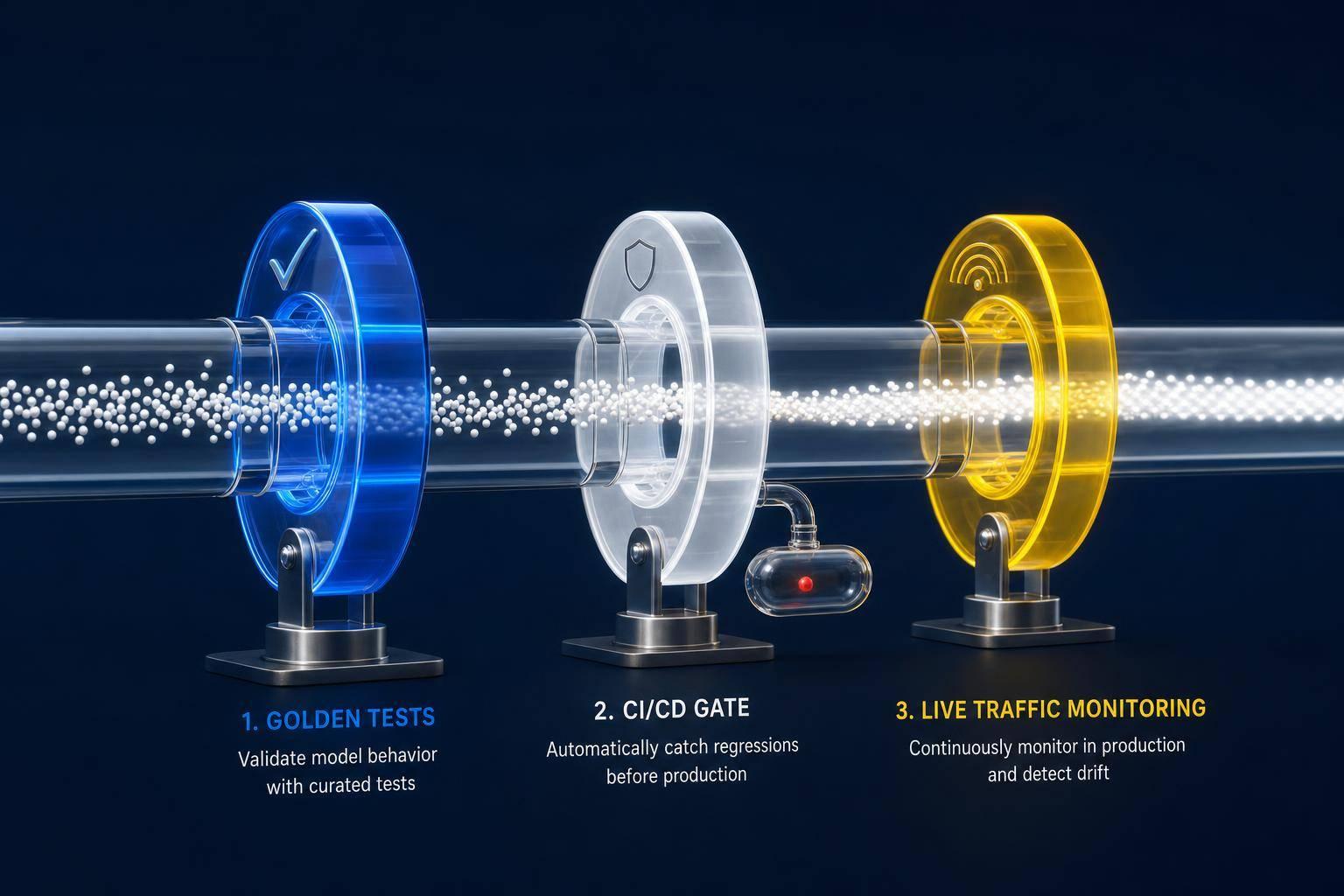
Low-friction feedback—thumbs, reason pickers, and behavior signals—turn user actions into actionable LLM evaluations.

César Miguelañez

User feedback is key to improving large language models (LLMs). Without it, silent errors - like confidently incorrect answers - can go unnoticed. But collecting meaningful feedback is challenging: only 1-3% of interactions generate explicit user responses. Poor feedback design can make this worse, leading to incomplete or biased data.
To address this, effective feedback systems must be simple, intuitive, and integrated into user workflows. Examples include thumbs up/down buttons, reason pickers, and tracking user behavior (like copying text). Combining explicit feedback with implicit signals helps identify issues while minimizing friction for users.
Key Takeaways:
Simplify feedback collection: Use low-friction options like thumbs up/down with pre-filled tags.
Leverage implicit signals: Monitor user actions (e.g., edits, rephrased queries) to gather insights without interrupting workflows.
Close the loop: Let users know how their feedback improves the system to build trust.
The article also compares tools like Latitude, LangSmith, and Helicone, highlighting features like multi-turn tracing, self-hosting options, and pricing. Latitude stands out for its structured annotation queues and automated evaluation generation, helping teams identify and resolve issues faster.
Quick Tip: Start with basic feedback tools, then expand to include reason pickers and behavior tracking for deeper insights.
UX Patterns for Collecting Feedback
Simple Binary Feedback (Thumbs Up/Down)
Thumbs up/down controls offer a quick, effortless way for users to provide feedback. This simplicity helps users feel more in control, especially when a model makes a mistake. Being able to mark an output as incorrect and move on fosters a sense of trust and empowerment.
Interestingly, binary feedback captures responses from about 4–8% of interactions. While this might not sound like much, it's a significant improvement over more complicated feedback methods. The secret lies in keeping it frictionless - every extra step beyond a single click can cut completion rates by nearly half.
Multi-Level Feedback Workflows
The real value of feedback often comes after a thumbs-down. Adding a reason picker - options like "too long", "factually incorrect", or "wrong tone" - turns vague dissatisfaction into actionable insights [1, 9].
This method works much better than asking users to type out their feedback. The takeaway? Make it easy to share details, but don’t force it.
Tracking User Behavior as Feedback
Sometimes, users provide feedback without even realizing it. Their natural behaviors can reveal a lot. For instance, clicking "copy to clipboard" signals that the response was helpful, while rephrasing a question within three minutes suggests the initial answer fell short [1, 7]. These implicit signals gather data from every user without requiring any extra effort.
Edit detection adds another layer of understanding. If users make significant edits (over 30% changes), it points to a weak original response, while minor tweaks are more neutral. These edits can even be turned into "preference pairs" to improve future model training. This approach keeps users focused on their tasks instead of interrupting them with feedback requests.
Direct Feedback Requests
While implicit signals are incredibly useful, direct feedback requests are sometimes necessary for more detailed insights. Tools like rating scales, surveys, and reaction buttons work best for specific research purposes rather than ongoing quality checks.
Timing is critical here. Asking for feedback too soon - before users have had enough time to evaluate the output - can lead to noisy or accidental responses. When you do ask, make sure the original prompt and response are visible so users can refer to them while providing feedback [9, 14].
Regenerate Buttons with Refinement Options
A simple "Regenerate" button lets users signal dissatisfaction but doesn’t explain what needs fixing. Adding directional controls like "Make shorter", "Change tone", or "More formal" refines the next output and makes the process more effective [4, 9]. This is particularly helpful for tasks like writing or coding, where results can vary widely.
Quick-action buttons are perfect for beginners, while free-text inputs cater to experienced users. Keeping the original output visible during regeneration allows users to compare versions and understand the changes.
Together, these UX patterns create a solid framework for collecting and refining feedback, paving the way for a deeper comparison of tools in the next section.
Feedback Tool Comparison
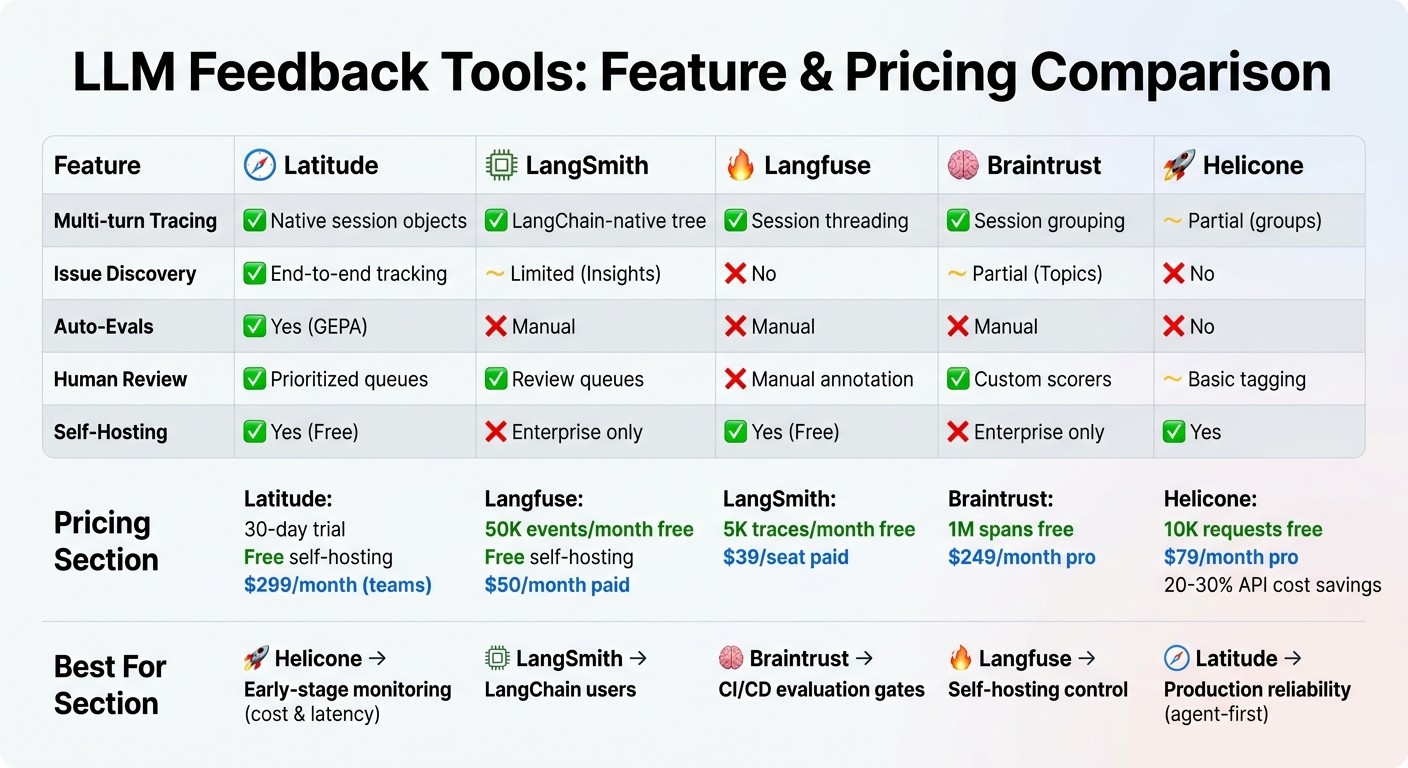
LLM Feedback Tools Feature Comparison: Latitude vs LangSmith vs Langfuse vs Braintrust vs Helicone
Feature Comparison Table
When it comes to feedback tools, understanding how they meet production reliability and evaluation needs is key. Some tools excel in monitoring and cost tracking, while others focus on evaluation pipelines or production reliability. Here’s a breakdown of how the main options compare:
Feature | Latitude | LangSmith | Langfuse | Braintrust | Helicone |
|---|---|---|---|---|---|
Multi-turn Tracing | Native session objects | LangChain-native tree | Session threading | Session grouping | Partial (groups) |
Issue Discovery | End-to-end tracking | Limited (Insights) | No | Partial (Topics) | No |
Auto-Evals | Yes (GEPA) | Manual | Manual | Manual | No |
Human Review | Prioritized queues | Review queues | Manual annotation | Custom scorers | Basic tagging |
Self-Hosting | Yes (Free) | Enterprise only | Yes (Free) | Enterprise only | Yes |
Pricing and Plans
Latitude: Offers a 30-day trial and free self-hosting, with paid plans starting at $299/month for teams.
Langfuse: Provides 50,000 events per month for free (plus free self-hosting) and paid plans starting at $50/month.
LangSmith: Includes 5,000 traces per month in its free tier, with paid plans at $39 per seat.
Braintrust: Stands out with 1 million spans free, then $249/month for pro features.
Helicone: Starts with 10,000 free requests and $79/month for pro, offering API cost savings of 20–30% through semantic caching.
Tool Highlights
Helicone: Best suited for early-stage monitoring, focusing on cost and latency.
LangSmith: Ideal for teams already using LangChain.
Braintrust: Excels in CI/CD evaluation gates.
Langfuse: Perfect for teams seeking full control through self-hosting.
Latitude: Designed for production reliability with its agent-first architecture.
These distinctions set the stage for Latitude's unique approach to feedback and evaluation, which is explored below.
Latitude's Approach to Feedback and Evaluation
Latitude takes a "continuous reliability loop" approach to feedback, integrating it directly into production workflows. Instead of relying on synthetic test cases, the platform focuses on real-world production traces. These traces are funneled into structured annotation queues, where domain experts review actual failures. The result? Teams can identify and fix real issues faster.
At the heart of this system is GEPA (Generative Evaluation from Production Annotations). This feature transforms human feedback into automated evaluations, turning real production problems into regression tests. It’s a proactive way to catch and address issues before they impact users.
Latitude’s agent-first design emphasizes multi-turn sessions, providing a broader view of interactions rather than isolated requests. When problems arise, the platform automatically clusters them and tracks their lifecycle, treating them like software bugs. This helps teams measure how well their evaluations address real user concerns over time, ensuring regressions are caught early.
For $299/month on the Team plan, Latitude includes 500 million evaluation tokens per month, 90-day trace retention, and unlimited annotation queues - making it a strong choice for teams running AI in production who need to debug quickly and prevent recurring issues.
How to Implement Feedback Patterns
Explaining How Feedback Gets Used
Let users know how their input makes a difference. For example, if someone clicks a thumbs-down button, explain that their feedback helps refine the model or is reviewed by your team. This kind of transparency builds trust and encourages more people to share their thoughts.
Make sure to close the loop publicly. As the Netspective Unified Process highlights:
"Trust doesn't come from getting it right the first time. It comes from learning publicly and visibly every time you get it wrong".
If you fix an issue based on user feedback, let them know. Even a simple message like "We improved this based on your feedback" can strengthen the connection with your users.
Now, let’s explore how to integrate this feedback into your development process.
Connecting Feedback to Development
Once you've earned user trust, the next step is to tie their feedback directly to your development workflow. By tagging each AI interaction with a unique ID that flows between your backend and frontend systems, you can precisely track which prompts are causing issues . This traceability is essential for diagnosing and resolving problems effectively.
Take a balanced approach by using both explicit feedback (like corrections) and implicit signals (like user behavior) to assess quality. For example, NVIDIA used production feedback to fine-tune a smaller model, achieving 98% accuracy while also reducing inference costs.
When gathering feedback, opt for binary metrics like Pass/Fail instead of 1-5 scales. Binary judgments are more consistent and reduce noise in your datasets. For detailed feedback, validate it with a "judge" model like Claude or GPT-4 to filter out spam or low-quality contributions before incorporating it into your training pipeline.
Start Simple, Then Expand
Kick things off with basic thumbs-up and thumbs-down buttons. These are easy to implement and tend to get the highest participation rates . Keep in mind that every extra step beyond a single click can cut completion rates in half.
Once you've nailed the basics, add a reason picker for thumbs-down responses. Use horizontal, one-click tags like "wrong info", "too long", or "not helpful" to make it simple for users to provide actionable feedback. This approach typically achieves about 60% completion without requiring users to type anything.
Don’t overlook implicit signals from the start. Actions like copying text, rephrasing questions within a few minutes, or abruptly leaving can reveal problem areas without adding any friction for users . While these signals won’t pinpoint exact issues, they highlight where improvements are needed on a broader scale. By starting with these foundational steps, you create a strong base for ongoing refinement and growth.
Production Examples of Feedback Collection
ChatGPT's Feedback System
ChatGPT uses a straightforward thumbs up/down system for every response. This design keeps things simple and ensures users can provide feedback quickly and effortlessly. The two-step process gathers valuable insights without adding unnecessary complexity.
Perplexity's Layered Feedback Approach
Perplexity takes a more detailed approach by providing transparency into the AI's reasoning process. It displays status indicators like "researching" and "reasoning" through a Chain of Thought interface. This setup allows users to see how the AI arrives at its conclusions, making it easier to identify mistakes. For instance, if the AI goes astray during research, users can pinpoint the exact moment things went wrong, making feedback more precise and actionable.
Latitude's Annotation and Evaluation Workflow
Latitude incorporates user feedback directly into its development process with annotation queues and automated evaluation generation. Feedback from users is funneled into annotation queues, where issues are reviewed and categorized. Each issue is then automatically converted into an evaluation test, transforming feedback into actionable test cases. This system helps prevent recurring problems by catching potential regressions before they affect users. Additionally, since the evaluations are based on real user feedback rather than artificial benchmarks, teams can debug issues more efficiently and improve the overall user experience.
Key Takeaways
How UX Design Affects Feedback Quality
The design of your feedback interface plays a crucial role in determining both the quantity and quality of the data you collect. Here's a striking fact: every extra click reduces completion rates by a staggering 50%. To counter this, use low-friction elements like pre-filled tags to keep users engaged and ensure higher completion rates.
The best results come from combining two approaches: effortless implicit signals and focused explicit feedback. Why does this matter? Because 88% of users are unlikely to return after just one bad experience. Nail the feedback design, and you’re not just improving data collection - you’re also boosting user retention.
Getting Started with Feedback Patterns
To lay a strong foundation, start with three essential features:
Streaming output to reassure users that the system is working.
A regenerate button to highlight variability in responses.
Thumbs up/down buttons for quick quality assessments.
Once these basics are in place, make sure to record the full interaction data right away - this includes the prompt, model version, retrieved documents, and a unique interaction ID. Capturing this context upfront sets you up for effective analysis.
After establishing baseline metrics, enhance your system by adding a reason picker for thumbs-down responses. Provide one-click options like "too long" or "factually wrong" to make the feedback actionable. As your system evolves, integrate implicit signals like tracking edits or copy events. These methods let you gather detailed insights without requiring extra effort from users.
FAQs
What’s the fastest feedback UI to start with?
The easiest and fastest feedback UI to get up and running is explicit user feedback, such as thumbs up/down buttons or star ratings. These methods are straightforward to implement and offer clear, actionable insights into user satisfaction, making them a great choice when you're just getting started.
How do I use user behavior as feedback without being creepy?
To incorporate user behavior as feedback without overstepping boundaries, pay attention to implicit signals. These include actions like accepting responses, rephrasing queries, time spent on a session, copying outputs, or retrying searches. Such behaviors naturally indicate user engagement and satisfaction without requiring direct input. Additionally, using lightweight or deferred feedback methods can provide helpful insights while prioritizing user privacy and maintaining a comfortable experience.
How do I turn feedback into regression tests?
When building regression tests for LLM-powered applications, human feedback plays a crucial role. This feedback - whether it's in the form of ratings, comments, or annotations - can help pinpoint where the model falls short.
By examining explicit signals like user ratings or more subtle cues like behavioral patterns, you can uncover areas that need attention. These insights can then be transformed into evaluation cases, allowing you to track the model's performance over time.
To make this process more effective, it's essential to annotate and group feedback into clusters. This ensures the tests mirror actual issues users encounter, making it easier to address real-world challenges and refine the model continuously.