

If your eval data is weak, your model scores can look fine while users get worse results. That’s the core point: I need eval data that matches production use, stays separate from training data, gets labeled well, and is checked for drift, duplication, and contamination.
Here’s the short version:
-
I build evals from production traces , not just synthetic prompts
-
I sample for coverage , not just more volume
-
I keep a small golden set for release checks and a rolling set for recent production changes
-
I use clear schemas, plain-language rubrics, and versioned datasets
-
I start with rule-based checks , then human review, then a calibrated LLM judge
-
I watch for 10%–30% contamination , 5–20 point score inflation , and stale eval sets older than 6 months
-
I track drift with signals like embedding distance , intent mix changes , prompt hashes, and retrieval overlap
-
I turn production failures into new regression tests through a simple loop: sample, anonymize, label, add, monitor
A few numbers stand out. The article notes 80%–85% human agreement as a baseline before automating labels, 85%+ judge agreement after calibration, and a common logging pattern where teams keep full payloads for only 5%–10% of traces to control cost. It also suggests holding back 20% of the golden set so prompt tuning doesn’t leak into test performance.
What I take from this is simple: good evals are less about bigger datasets and more about clean, current, production-matched test cases. The rest of the article explains how to build that system and keep it stable over time.
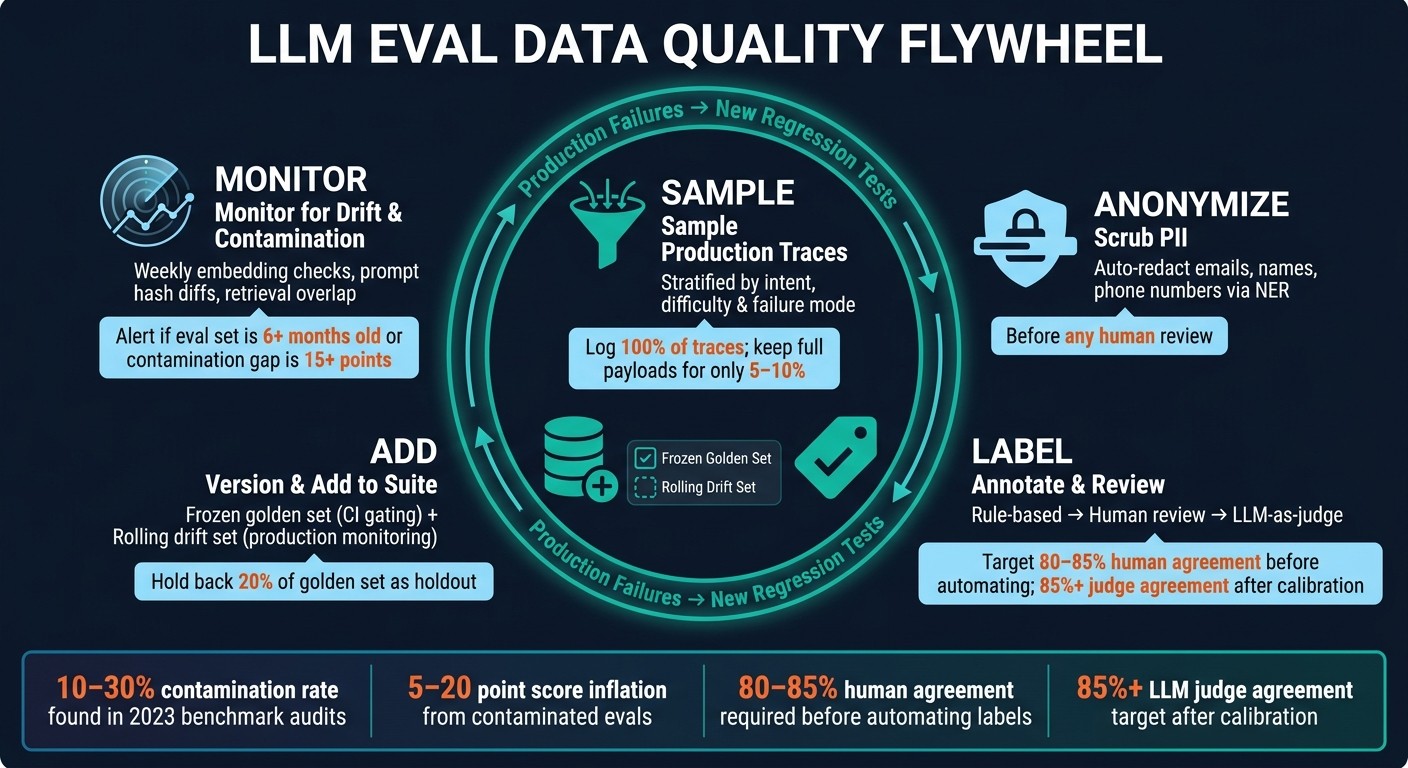
LLM Eval Data Quality Flywheel: From Production Traces to Regression Tests
Build eval datasets from production traces
Once you’ve defined data quality, the next step is finding cases that match how people use your product in production.
Synthetic benchmarks help, but only up to a point. They reflect what developers think users will do, not what users actually do. The tricky stuff - the weird prompts, messy inputs, and edge cases - usually shows up in production traces, not in a lab setup.
The process is pretty straightforward: collect traces, sample the right ones, and turn them into labeled eval cases. Start with a small golden set. Then grow it only when doing so improves coverage. More data isn’t the goal here. Coverage matters more than volume , so sample by intent, difficulty, and failure mode.
Sample across intents, difficulty, edge cases, and time
Use stratified sampling instead of random sampling. If you sample at random, common inputs tend to flood the dataset while rare failures get pushed out. That means you miss the long tail, which is often where models break down the hardest.
A better approach is to cluster traces by intent, then sample in a way that keeps the dataset balanced. Pull proportionally from large clusters, and oversample smaller ones so unusual cases don’t disappear.
It also helps to sample latency and cost outliers. Those traces often point to terse refusals or runaway verbose responses. And don’t let the dataset go stale. Eval sets decay as products change, so set a recurring refresh cadence - monthly or every sprint - to pull new logs, spot new clusters, and retire stale examples.
That approach only works if traces are logged with enough structure to become eval cases later.
Use observability tools to turn traces into eval cases
Observability platforms make raw traces far more useful for evaluation work. They capture the details that give an eval case context: conversation history, model version, tool calls, retrieved context, latency, tokens, and cost.
Some tools also make the workflow easier. Latitude and LangSmith help move traces into eval pipelines. Langfuse, Braintrust, and Helicone are useful for finding and inspecting failure patterns.
For high-traffic products, a common cost-control move is to log 100% of traces but keep full payloads for only 5–10%. Before those traces go to annotation, run automatic PII redaction - emails, phone numbers, and names - through NER so you stay compliant.
The source you use affects speed, realism, and how much labeling work you’ll need.
Table: Production-derived datasets vs. synthetic and benchmark datasets
| Feature | Production-Derived | Synthetic |
|---|---|---|
| Representativeness | High; reflects real user behavior and edge cases | Low; reflects what developers expect users to do |
| Creation speed | Fast once instrumentation is in place | Very fast; LLMs can generate at scale |
| Labeling effort | Higher; requires human review or LLM-as-judge | Lower; labels can be generated alongside the data |
| Coverage of real failures | High; captures edge cases from actual usage | Low; misses failure modes developers did not anticipate |
| Drift sensitivity | High; refreshable from new production logs | Low; static unless regenerated manually |
Structure, label, and version datasets for repeatable evals
Once you’ve picked the traces, the next step is to standardize them so they score the same way every time. Raw traces only become repeatable evals when they follow a stable schema, use clear labels, and live under version control.
Define schema, rubrics, and scoring dimensions
Each eval case should include a stable case_id, the full input_payload (user query, chat history, retrieved context, and tool definitions), an expected_behavior written in plain language, and metadata like evaluation_type, risk_level, source, labeled_by, and version_added. For RAG apps, keep retrieved context separate from the user prompt. That makes it much easier to tell whether a miss came from retrieval or from generation.
The expected_behavior field tends to last longer than a single exact-answer key. For example, a rule like “must mention the 30-day refund window” holds up far better than one fixed response template when wording changes.
Score cases across these dimensions:
-
accuracy
-
relevance
-
groundedness (faithfulness to retrieved context)
-
safety
-
business-policy alignment
Store the rubric with each case so old scores still make sense if the rubric changes later. If the rubric does change, older cases should keep their original criteria. That way, your past comparisons still mean something.
Once the case format is locked, define how labels get created and checked.
Set up human review and LLM-as-judge with calibration
One easy mistake is rushing into LLM-as-judge before you’ve set a human baseline. Start with deterministic checks first: regex, JSON schema validation, and exact match. They’re fast, cheap, and leave little room for debate.
For open-ended outputs, use a tiered review flow. Annotators label cases, reviewers spot-check for consistency, and subject matter experts handle the messy edge cases. It also helps to mix pre-labeled gold-standard cases into annotator queues so you can catch drift and fatigue early.
Aim for 80% to 85% human agreement before you automate anything. After that, calibrate the LLM judge against the labeled set. Run the judge on the human-labeled subset, then tune the prompt until agreement goes past 85%. Stick with binary Pass/Fail or short Likert scales instead of 1–10 ratings. LLM judges tend to wobble on broad numeric scales.
Human review sets the baseline. Versioning keeps that baseline intact. Once labels are stable, lock the dataset version so scores stay comparable across runs.
Table: Human annotation vs. LLM-as-judge vs. rule-based scoring
| Scoring Method | Cost | Scalability | Speed | Consistency | Bias Risk | Best For |
|---|---|---|---|---|---|---|
| Rule-based | Near zero | Infinite | Instant | Perfect | Low | JSON schema, exact facts, banned phrases |
| LLM-as-judge | Low to medium | High | Seconds | High if calibrated | High | Summarization, tone, policy compliance |
| Human review | High | Low | Hours to days | Variable | Moderate | Ground truth, complex reasoning, safety |
Store datasets in Git or a registry like DVC, tag each release, and make label changes through pull requests instead of ad hoc edits. Your changelog should clearly separate a wrong-label fix from new coverage, because relabeling can move scores even when the model itself hasn’t changed.
In CI/CD, pin a specific dataset version tag so your test set doesn’t drift over time. Also keep 20% of the golden set as a holdout. That helps stop prompt tuning from quietly overfitting to the test set.
Common data quality failures that break evals
Even versioned evals can fall apart when they overlap with training data or drift away from production. A clean-looking dataset can still give you bad signals. And that’s the tricky part: the worst failures usually don’t look like failures at all. Your eval scores seem fine, while the model is struggling in places that matter.
Detect contamination, duplication, and label leakage
Contamination bumps scores up when eval cases overlap with model training data. In 2023 audits, item-level contamination ranged from 10% to 30% , which pushed benchmark scores up by 5 to 20 points. Start with exact-match scans. Then check longest-match patterns for templated text and paraphrase similarity for rewritten items. If you see a 15-point or more gap between benchmark results and fresh production cases, that’s a strong sign of contamination.
Label leakage happens when annotators see a model draft before writing the gold answer. Once that draft is on the screen, people tend to anchor on it and fix only the obvious mistakes. The result is a label that carries over the model’s wording and bias. The same thing happens when thumbs-up production feedback gets promoted straight into eval labels. The fix is simple: annotators should write gold answers from scratch first, before looking at any model output.
There’s another problem that creeps in over time. Prompts change. Retrieval changes. User traffic changes. But the dataset stays frozen.
Monitor drift, bias, and safety coverage over time
Three types of drift slowly wear down eval quality: input distribution, prompt templates, and retrieval corpora.
| Drift Type | Detection Signal | Remediation |
|---|---|---|
| Input distribution | Embedding centroid distance, KL divergence on intent labels | Stratified production sampling |
| Prompt template changes | Template hash diff | Dataset versioning & re-baselining |
| Retrieval corpus changes | BM25 or embedding overlap in the top retrieved chunks | Retrieval-corpus snapshotting |
Run weekly embedding checks by comparing your golden set with a rolling 7-day window of production traces using Jensen-Shannon divergence. For RAG systems, snapshot the top-k document IDs for each golden-set query when you author it, then monitor BM25 overlap every time you refresh the set. Also hash the system message and tool schemas nightly, and alert on mismatches.
A few warning signs deserve extra attention:
-
Scores stall near 90%+ , but user impact doesn’t improve
-
Eval sets are older than six months , especially if they came from the web
-
Safety issues like prompt injection, toxicity, or policy violations barely show up in aggregate scores
That last point matters a lot. Keep a separate edge set for prompt injection, toxicity, and policy violations. Aggregate metrics can hide these failures, but risk-level slices expose them fast.
Treat these checks as gates before a trace becomes a new regression test.
Operationalize data quality with recurring workflows and tooling
Once a trace clears your quality checks, don’t let it sit there. Put it into a recurring regression loop.
That’s the point here: make data quality a repeatable engineering habit that runs right alongside releases and incident response.
Build a recurring workflow from production issue to regression test
A simple way to think about this is a five-step flywheel: sample, anonymize, label, add to the suite, and monitor drift. One step feeds the next, and the loop keeps moving.
When something breaks in production, start by reading 50–100 traces. Don’t force categories too early. Let the failure patterns show up on their own. Then group them into a taxonomy like hallucinations, retrieval misses, and tool argument errors.
After that, rank the clusters with a basic frequency × severity matrix so you know what deserves attention first. A bug that shows up all the time and causes bad outcomes should go to the top of the list. Before anyone reviews those traces, scrub PII.
Next, push candidate traces into an annotation queue. Subject matter experts should rewrite the gold answer to match what the agent should have said. They should also apply a binary Pass/Fail label and leave a written critique explaining the call.
Once the examples are labeled, add them to a versioned eval suite. Then rerun that suite in CI before the next release.
Your observability platform can help automate this whole loop. Latitude is a good example because it can turn production issues into evals and send failures into review queues. But the tool is not the main thing. The loop is.
It’s also smart to keep two separate dataset pools:
-
A frozen golden set for CI gating
-
A rolling drift set for recent production
Keep that boundary clear. Stable evals need both: a fixed benchmark for release checks and a live view of what’s happening in production now.
Table: Compare Latitude, Langfuse, LangSmith, Braintrust, and Helicone
 Platform Platform |
Trace Collection | Dataset Curation | Versioning | Annotation | Experiment Tracking | Regression Monitoring | Best Fit For |
|---|---|---|---|---|---|---|---|
| Latitude | OTLP/SDK | Auto-generation from production issues | Immutable snapshots | Anomaly-prioritized queues | Side-by-side variants | Quality tracking | Teams automating the production-to-eval loop |
| LangSmith | Native LangChain | Manual/Promoted | Automatic version tags | SME-led queues | Comparison view | Regression dashboards | Teams in the LangChain/LangGraph ecosystem |
| Langfuse | OpenTelemetry | Manual | Versioned artifacts | Single queue (free) | Hierarchical traces | Score analytics | Teams needing open-source or self-hosted scale |
| Braintrust | SDK-based | Manual | Git-like versioning | Manual annotation | Playground/Experiments | Real-time scoring | Enterprise teams with heavy CI/CD gating needs |
| Helicone | Proxy-based | Limited | Basic | Manual | Cost/latency focus | Basic monitoring | Teams prioritizing cost and token usage tracking |
Conclusion: Keep eval data representative, clean, and current
Good eval data does not stay good by itself. The discipline is pretty simple: build datasets from real production traces instead of synthetic data, version everything, and check often for contamination and drift.
That flywheel - sample, anonymize, label, add to the suite, monitor drift - turns data quality into a normal part of the team’s workflow. Tie it to your release cycle and incident process, and eval quality becomes something you maintain all the time instead of something you scramble to fix right before launch.
FAQs
How big should an eval dataset be?
For LLM evals, quality and diversity matter more than raw size.
A good starting point is 20–50 real production traces to set a baseline. For early error analysis and sanity checks, 50–100 is often enough. And during active development, aim for around 200 rows if you want a signal you can actually trust.
You usually don’t need more than 500 rows unless you’re doing rigorous pre-deployment testing on a mature system.
The big idea is simple: don’t chase a big, flat sample. Put your effort into coverage instead, including:
-
User personas
-
Edge cases
-
Failure modes
That mix will tell you more than a large, uniform dataset ever will.
How often should I refresh my eval set?
Refresh your evaluation set at least quarterly. In many cases, monthly updates work better because they help prevent dataset decay.
You should also refresh it when you ship a model swap, a vendor patch, or a prompt edit. The same goes for periods right after a major production incident or around expected changes in user behavior, like seasonal spikes.
A simple way to spot stale data is to compare a stable gold set with a shadow set pulled from recent production traffic. That side-by-side view can show when your evaluation data no longer matches what’s happening in production.
When should I use human review vs. an LLM judge?
Use human review to set the ground truth, make high-stakes calls, and judge nuanced things like tone or domain-specific accuracy. It doesn’t scale well, so save it for edge cases, calibration, and audits of severe failures.
Use an LLM judge when you need scale. It works well for checks like correctness, faithfulness, and helpfulness. Before you use it as a deployment gate, calibrate it against human labels.
In practice, the best setup is to use both: LLM judges for volume, humans for low-confidence or critical cases.