

Improving prompts for large language models requires a systematic approach. Here’s the process in a nutshell:
-
Define Clear Objectives : Set specific goals and measurable metrics, like reducing hallucination rates or improving accuracy.
-
Generate Baseline Outputs : Create initial prompts, document results, and identify weaknesses or recurring issues.
-
Collect Expert Feedback : Work with domain specialists to get structured, actionable insights on tone, accuracy, and alignment with goals.
-
Revise Prompts : Make incremental changes based on feedback, test alternative structures, and document every adjustment.
-
Test and Evaluate : Use layered evaluations (automated checks, model scoring, and human review) to measure improvements and ensure quality.
This method blends automated tools with expert input to refine prompts effectively. Teams using this approach have seen measurable gains, such as improved accuracy and reduced development time. By focusing on clear objectives and structured workflows, you can elevate the quality of AI outputs while maintaining efficiency.
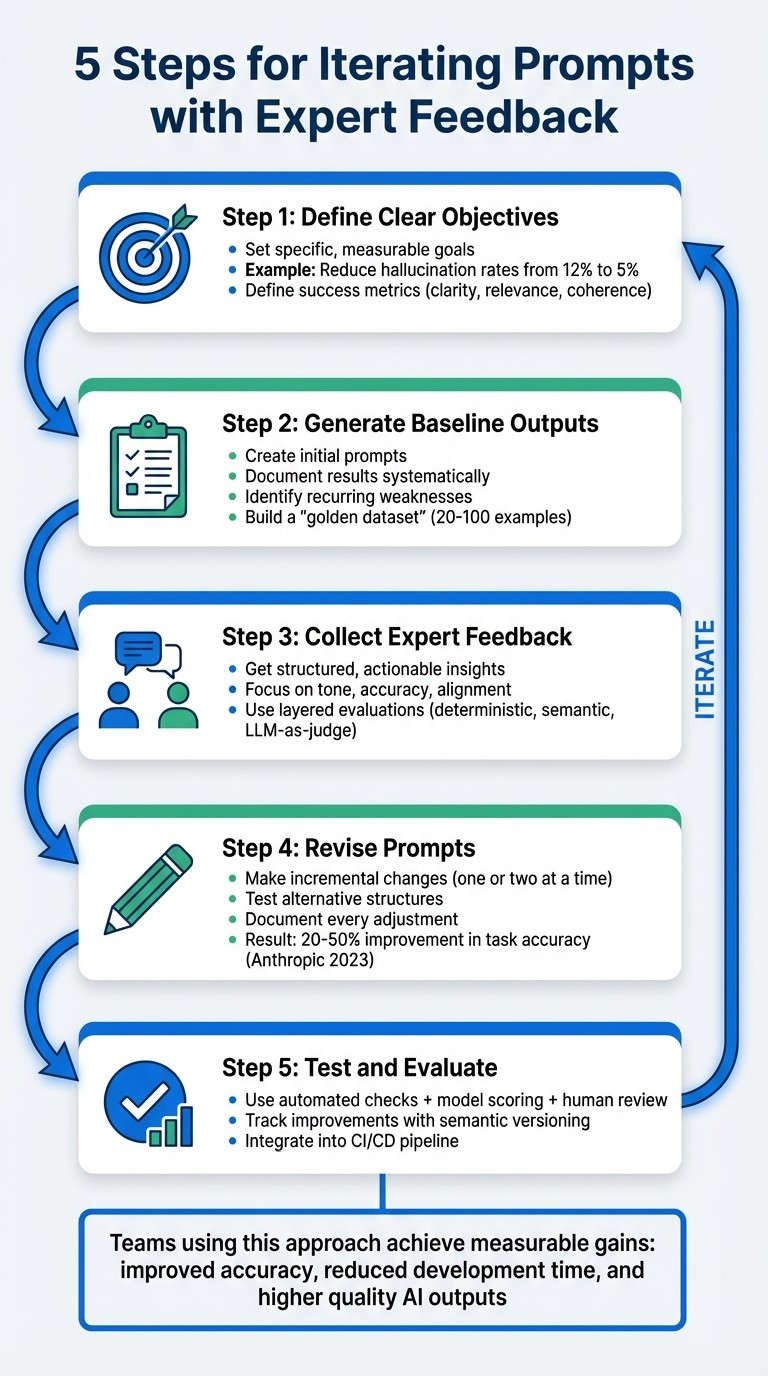
5-Step Process for Iterating AI Prompts with Expert Feedback
Step 1: Define Clear Objectives Before Iteration
Start by defining what success looks like. Without clear objectives, reviewers might interpret quality differently - one could see an output as outstanding, while another might find it problematic. This lack of consistency can derail your efforts.
Clarify the Purpose of the Prompt
Tie the prompt’s goals to its intended use. For example, a customer support chatbot needs to prioritize empathy and clarity, while a code generation tool must focus on syntax accuracy and proper formatting. These distinctions are critical - what works well for one scenario might completely fail in another.
“This upfront clarity helps reduce unnecessary trial-and-error and ensures that subsequent iterations are aligned with a single, well-defined objective.” - Mirascope
Be specific about constraints like length, format, or scope. For instance, instead of saying “helpful” or “accurate”, translate these into measurable properties like “responses must not exceed 200 words” or “all factual claims must be backed by retrieved documents.” This approach ensures your prompt aligns with the actual business need, not just technical correctness.
Set Success Metrics
Define measurable goals - for example, aim to decrease hallucination rates from 12% to 5% - rather than vague improvements. Establish a baseline for performance before making changes so you can track whether your adjustments are effective.
Focus on three core quality dimensions : clarity (how easy it is to understand), relevance (how well it matches user intent), and coherence (logical consistency). Add specific metrics for your use case. For negative traits like toxicity or hallucinations, aim for lower scores. You can also combine multiple objectives into a composite score for simpler tracking.
| Quality Dimension | Key Question for Objectives | Success Metric Example |
|---|---|---|
| Clarity | Are the instructions easy to understand? | Compliance rate with constraints |
| Relevance | Does the output align with user intent? | Precision/Recall scores |
| Coherence | Is the response logical and consistent? | Human-in-the-loop logic rating (1-5) |
| Accuracy | Is the information factually correct? | Hallucination rate % |
| Performance | Is the response delivered efficiently? | Latency (milliseconds) |
Another useful technique is role assignment. By explicitly defining the model’s role - such as “Act as a financial analyst” - you narrow its focus, enabling it to adopt specific tones and levels of detail. This also helps domain experts provide more targeted feedback by evaluating based on clear quality dimensions rather than personal preferences.
With well-defined objectives and measurable criteria in place, you’re ready to generate initial outputs and establish baseline performance. You can also get started with PromptL to structure your prompts more effectively.
Step 2: Generate Initial Output and Baseline Performance
Once you’ve set your objectives, the next step is to draft your initial prompt and run it to establish baseline outputs. Think of this as your starting point - a foundation to identify areas that need improvement.
Document Baseline Outputs
Baseline outputs act as a benchmark for refining your prompts. It’s crucial to systematically log these outputs alongside your expected results, making note of any discrepancies. This process helps you build a “golden dataset”, a reliable reference point for testing future iterations.
Take, for example, the work of a research team at Stanford Health Care, led by Dr. François Grolleau. Between January 2023 and June 2024, they developed the MedFactEval framework. Using feedback from a panel of seven physicians, they created a “ground truth” for discharge summaries of 30 adult inpatients. By continuously refining prompts to align with these expert-validated facts, the team built an automated system that achieved an impressive 81% agreement with clinical assessments.
Certain traits, such as toxicity or hallucinations in outputs, should ideally trend toward zero. Comparing the model’s actual performance against your ideal outcomes can uncover areas requiring adjustment.
Identify Weaknesses
This step is all about pinpointing specific failure patterns rather than just general performance gaps. Analyzing your baseline outputs helps you uncover recurring issues. For instance, in December 2025, the AI startup NurtureBoss, led by founder Jacob and supported by machine learning expert Hamel Husain, conducted a detailed review of their leasing assistant’s outputs. By manually examining hundreds of responses, they identified common failure themes - like errors in date handling, handoff issues, and problems with conversation flow. Armed with this information, they developed a targeted LLM-as-judge system to validate and refine prompts on an ongoing basis.
Ask yourself: Does the model repeatedly fail at formatting? Does it struggle with certain question types? Categorizing these recurring issues allows you to tackle them systematically in the next iteration. This structured approach ensures you’re focusing on changes that will make the biggest impact.
Step 3: Collect Actionable Feedback from Domain Experts
It’s time to bring in the experts. Domain specialists can turn a basic prompt into a highly refined tool. With your objectives clearly outlined and baselines documented, their insights will help fine-tune your prompt for precision. But here’s the catch: feedback only works if it’s structured, specific, and actionable. Let’s dive into how to get the most out of expert input.
Guide Experts in Feedback Delivery
The feedback you receive is only as good as the way you ask for it. Avoid vague requests like “Make this better.” Instead, ask for evaluations on specific aspects such as tone, content accuracy, and structure. For example, you might ask:
-
Is the tone suitable for the intended audience?
-
Does the output include all the necessary information?
-
Are there any factual inaccuracies or logical gaps?
Encourage experts to provide targeted qualitative feedback. This means asking them to directly edit or assess areas like tone, completeness, and factual correctness. While scoring systems like yes/no or Likert scales can help you monitor overall quality and spot trends, they don’t tell you how to fix underlying issues. Iterative reviews may take more time, but they offer the in-depth insights you need to make meaningful adjustments.
Identify Gaps Between Prompt and Output
Once you’ve structured your feedback process, focus on identifying where the prompt and output don’t align. One effective method is using chain-of-thought reasoning. This involves asking the model to explain its step-by-step logic before providing a final answer. It gives experts a clear view of where reasoning may falter.
Next, apply a series of layered checks to evaluate the output:
-
Deterministic checks : Look for structural issues like invalid JSON or missing required fields.
-
Semantic checks : Use embedding similarity to assess whether the output aligns with the intended meaning.
-
LLM-as-a-judge : Score the output against rubrics for faithfulness, completeness, and tone.
For high-stakes or ambiguous scenarios, route outputs to annotation queues where domain experts can manually label and score them. To ensure traceability, version everything - prompt text, model settings, and data transformations - so you can pinpoint issues with precision.
Step 4: Revise Prompts Based on Feedback
This step is all about using expert feedback to make precise, step-by-step improvements to your prompts. By focusing on targeted revisions, you can transform a decent prompt into an exceptional one. The key is to approach the process systematically, building on the feedback you’ve gathered to make measurable improvements.
Implement Incremental Changes
Start small - adjust one or two elements at a time. Why? Because making multiple changes at once can muddy the waters. If you tweak instructions, add examples, and adjust the tone all at once, it’s hard to pinpoint what worked or what might have caused new issues.
Focus first on clarifying any vague instructions. For example, instead of saying, “summarize this document”, try something more specific like, “list three key facts in bullet points.” Simple clarifications like this often lead to noticeable improvements. A 2023 study by Anthropic found that teams using iterative prompting saw 20-50% improvements in task accuracy after just three to five rounds of revisions.
Here’s a real-world example: In March 2024, OpenAI’s prompt engineering team, led by Lilian Weng, worked on a customer support prompt that initially had a resolution accuracy of 72%. After incorporating expert feedback, they added a structured response format and included a couple of few-shot examples. With four iterations, accuracy climbed to 94% , while escalations dropped by 18%. That’s a 24% improvement - proof of the power of incremental refinements.
To keep track of progress, version each change. This creates an audit trail, making it easier to review what’s been done and what worked best.
Experiment with Alternative Structures
If you hit a point where small tweaks no longer make a difference, it’s time to rethink the structure of your prompt. Try reordering instructions to emphasize the most critical information first. Switch from paragraphs to bullet points for better clarity. You can even introduce chain-of-thought prompting to help the model articulate its reasoning.
For example, in June 2023, Scale AI tackled a 15% hallucination rate in their data labeling LLM. Under project leader Alexandr Wang, the team reordered constraints and added expert-provided examples while keeping the core task unchanged. The result? The hallucination rate dropped to 3.2% in just three weeks , significantly improving the quality of over 10 million annotations.
When testing new structures, use a consistent evaluation rubric. Measure changes in metrics like accuracy, relevance, and completeness, and document the reasoning behind each experiment. This structured approach avoids random guesswork and builds a solid foundation of knowledge for future projects.
Step 5: Test, Evaluate, and Iterate
Once you’ve refined your prompts, the next step is to rigorously test them to ensure each iteration delivers better results. This process establishes a reliable system for spotting issues early and tracking progress over time.
Establish Evaluation Frameworks
To catch problems effectively, layer multiple evaluation methods:
-
Start with deterministic checks : Tools like JSON schema validation, regex patterns, and character limits can quickly flag formatting issues without relying on AI.
-
Use LLM-as-a-judge evaluations : For subjective qualities like tone, creativity, or helpfulness, employ a language model to act as a judge. Keep the temperature setting at 0 for consistent scoring, and use a model from a different family than the generator. For example, you might evaluate GPT outputs using Claude to reduce bias. Instruct the judge to explain its scores to make debugging easier.
-
Add human review for high-stakes scenarios : In critical fields like medicine or law, human reviewers are essential for handling complex or nuanced cases. Combine deterministic checks for formatting, LLM evaluations for subjective quality, and human oversight for edge cases.
To ensure consistency, create a golden dataset with 20–100 real-world examples as your benchmark. Run batch evaluations against this dataset whenever you revise a prompt. This helps confirm that updates don’t lead to performance issues. For production environments, implement live evaluations to monitor logs in real time for safety, formatting, and relevance.
Combine metrics like accuracy, relevance, conciseness, and safety into a single composite score. This score offers a clear picture of overall quality trends. Mark undesirable traits, such as toxicity or hallucinations, as negative metrics so optimization tools can work to minimize them.
Track Improvements and Document Changes
Adopt semantic versioning (MAJOR.MINOR.PATCH) to keep track of updates systematically:
-
MAJOR versions : Represent significant overhauls.
-
MINOR versions : Indicate new features or parameters.
-
PATCH versions : Cover minor fixes and tweaks.
For every change, document three key components:
-
Change description : Outline what was updated and why.
-
Performance impact : Compare metrics from before and after the change.
-
Recovery points : Provide a way to revert to earlier versions if necessary.
Integrate these evaluations into your CI/CD pipeline. Tools like GitHub Actions can automatically block deployments if a new prompt version doesn’t meet predefined quality thresholds. This system ensures that all updates are rigorously tested and reviewed, creating a feedback loop that drives continuous improvement. By documenting results and refining processes, you can consistently turn expert insights into measurable performance gains.
Implementing Workflows for Expert Feedback at Scale
Avoid Bottlenecks in Feedback Collection
Scaling expert feedback isn’t just about gathering input - it’s about doing so without bringing your team to a standstill. The real hurdle? Avoiding delays caused by manual reviews or waiting for engineers to retrieve logs. These bottlenecks can make iteration painfully slow.
To keep things moving, centralize your feedback system by decoupling prompts from your application code. This allows domain experts to review and suggest changes independently, without needing constant engineering support. Before finalizing any prompt changes, run them through your pre-defined golden dataset for regression testing.
Enable Cross-Functional Collaboration
Structured feedback is just the start. To truly refine prompts, you need seamless collaboration between teams. Domain experts know the desired outcomes, while engineers understand the technical constraints. Without clear communication, these groups can end up working in isolation, leading to mismatched goals and wasted time.
A RACI matrix can clarify roles and responsibilities. For example, domain experts focus on requirements and validation, while engineers handle feasibility and integration. Regular meetings help keep everyone aligned:
-
Weekly design sessions for planning prompt changes
-
Daily standups during implementation to address blockers
-
Bi-weekly reviews to validate results and refine processes
Here’s a breakdown of roles at each stage:
| Process Stage | Domain Expert Role | Engineer Role | Collaboration Point |
|---|---|---|---|
| Prompt Design | Define requirements | Review technical feasibility | Weekly design sessions |
| Implementation | Create test cases | Handle API integration | Daily standups |
| Validation | Verify business rules | Monitor performance | Bi-weekly reviews |
This structure keeps the workflow smooth and ensures each iteration is based on solid input.
Use Latitude for Workflow Efficiency

Latitude simplifies these workflows by acting as an AI gateway. It automatically logs inputs, outputs, tool calls, and metadata, making it easier for domain experts to review logs using a human-in-the-loop system. This turns qualitative feedback into actionable data.
The platform’s Guided Exploratory Prompt Adjustment (GEPA) system speeds up iterations by testing prompt variations against real-world evaluations. This approach resolves recurring issues 8x faster than manual testing. If a prompt version performs poorly, git-integrated version control allows for 65% faster rollbacks , ensuring quick recovery. Additionally, role-based access control ensures that only qualified team members can approve updates for production. By systematizing feedback, Latitude transforms it into a reliable engine for continuous improvement.
Conclusion
Improving AI-generated content is all about creating a process that’s both structured and repeatable. By following a 5-step framework - defining clear objectives, setting baselines, gathering actionable feedback, revising systematically, and evaluating results - teams can cut down on revision cycles, produce higher-quality outputs, and ensure the content aligns with business goals. This method also lays the groundwork for better documentation and accountability.
Speaking of documentation, it’s crucial to record every change and assign clear responsibilities. This not only ensures consistency but also creates a traceable system that scales well, whether you’re managing a small team or coordinating efforts across departments. Clear roles eliminate bottlenecks and keep the process moving smoothly.
Once you have solid documentation, structured workflows take efficiency to the next level. Centralized systems turn feedback into actionable steps, allowing experts to work independently while staying aligned. Tools like Latitude simplify this by logging inputs and outputs, supporting human-in-the-loop reviews, and offering version control to quickly revert changes if needed.
FAQs
How do I choose the right success metrics for my prompt?
When evaluating the effectiveness of your prompts, it’s essential to concentrate on metrics that measure relevance, accuracy, and alignment with your goals. Some key examples include:
-
Context Match Score (CMS): Assesses how well the prompt aligns with the intended context.
-
Meaning Similarity Score (MSS): Measures how closely the output matches the desired meaning.
-
Input-Output Match Score (IOMS): Evaluates how accurately the output corresponds to the input.
These metrics ensure your prompts are not only accurate but also aligned with your objectives. To improve results, focus on measurable factors like clarity , relevance , and performance , and keep monitoring them regularly. This ongoing refinement process helps create more effective and goal-oriented prompts.
What’s the minimum “golden dataset” I need to iterate safely?
To ensure safe iteration, you’ll need at least 150 question/answer pairs that address key scenarios and practical use cases. Each pair should include well-defined expected outcomes. This dataset acts as a reliable benchmark to catch regressions, maintain steady performance, and instill confidence before rolling out updates.
When should I use human review vs automated evaluations?
When assessing subjective aspects like clarity , tone , creativity , or safety concerns , human review is the way to go. These areas often require nuanced judgment and sometimes even expert insight to ensure the content aligns with user expectations or industry standards.
On the other hand, automated evaluations shine when it comes to objective, repeatable tasks. Think of things like checking for accuracy, validating formats, or running safety checks at scale. These processes are faster and more consistent when handled by machines.
The real magic happens when you combine the two - human feedback for qualitative insights and automated tools for quantitative metrics. Together, they create a more reliable and well-rounded way to evaluate and refine prompts.