

Testing prompts for AI systems is like debugging code - you can’t skip it if you want consistent results. Without proper validation, your AI features may fail under diverse user inputs, causing errors and inefficiencies. Here’s a quick guide to ensure your prompts deliver reliable outputs every time:
-
Define Success Metrics: Start with clear benchmarks like accuracy (e.g., 95%), cost efficiency (e.g., <$0.01/query), and latency (e.g., <2 seconds).
-
Build Realistic Test Datasets: Use production data, edge cases, and adversarial examples to create a robust dataset of 500–2,000 examples.
-
Test Prompt Variants: Experiment with prompt engineering concepts like zero-shot, few-shot, and chain-of-thought prompts. Tools like Promptfoo or Latitude can simplify this process.
-
Combine Automated and Human Reviews: Use platforms like LangSmith or Latitude for automated evaluations, and bring in human reviewers for nuanced feedback.
-
Analyze Failures and Iterate: Log issues systematically, refine prompts based on feedback, and track improvements over time.
This structured approach ensures your AI features are dependable and user-friendly in production. Want to dig deeper? Let’s break it down step-by-step.
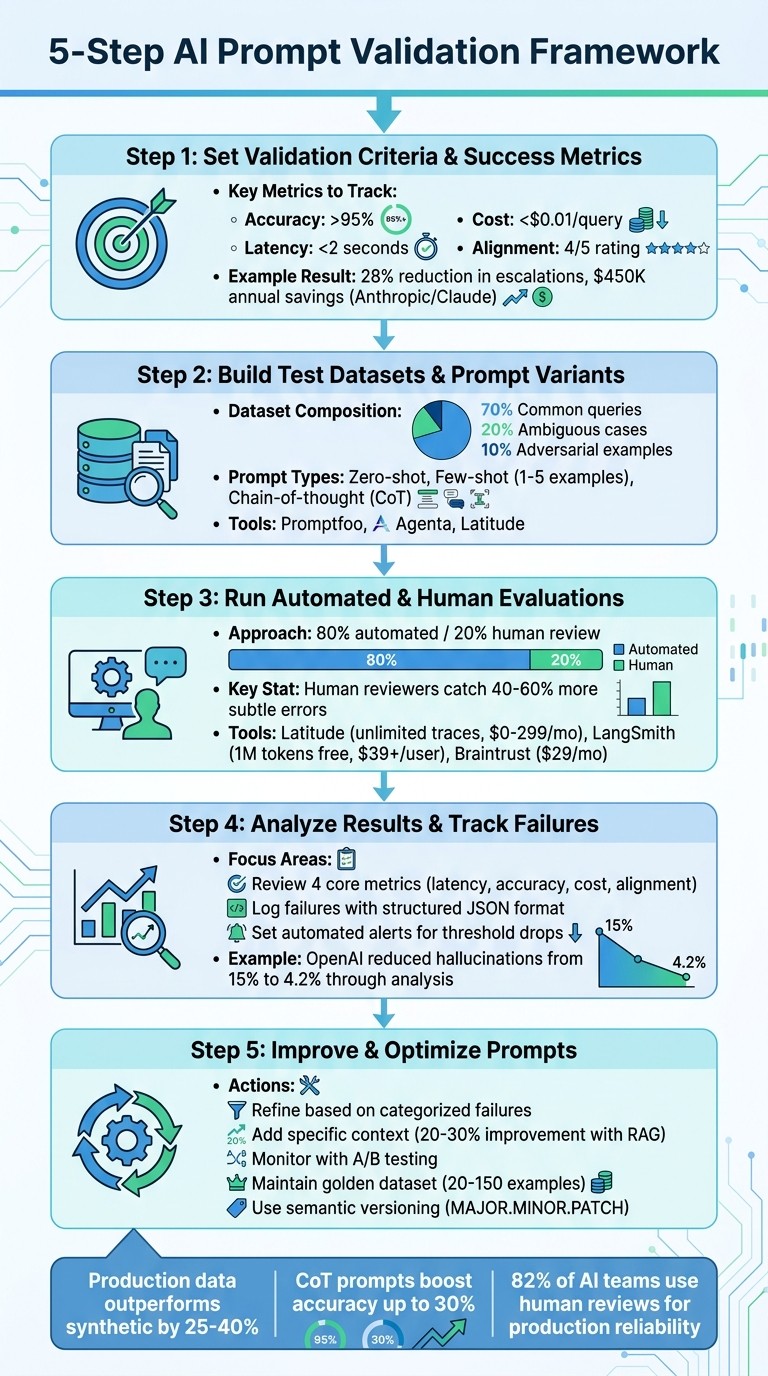
5-Step AI Prompt Validation Framework with Key Metrics and Tools
Step 1: Set Validation Criteria and Success Metrics
Before diving into testing, you need to define what success looks like. Without clear benchmarks, it’s impossible to know if a prompt adjustment improves or worsens performance. Set measurable criteria that align with your specific task to avoid guesswork.
Create Clear Prompt Guidelines
Start by developing detailed guidelines that cover clarity (avoiding ambiguity), specificity (defining exact output formats and constraints), tone (ensuring the voice fits the task), and formatting (structured outputs for easier parsing). These factors directly influence performance. For instance, in classification tasks, a prompt like “Classify as positive, negative, or neutral with a confidence score” can improve accuracy by 15-20% compared to vague instructions.
Tailor your prompts to fit the task. For example:
-
Spam detection : “Analyze the email text below. Output only ‘spam’ or ‘not spam’ followed by a 1-sentence explanation. Text: [input].”
-
Product descriptions for millennials : “Write a 100-word engaging description for [product], using an enthusiastic tone and 3 bullet points for features.”
-
Article summaries : “Summarize the key points in 3 bullet points, under 150 words, focusing on facts only: [article].”
The more specific your instructions, the less room there is for misinterpretation, reducing unexpected results in production.
Document these guidelines in a shared repository, such as Notion or Confluence. Include templates, examples, and assign clear ownership for reviewing and approving changes. This ensures consistency across your team and prevents everyone from creating their own standards.
Choose Success Metrics
Metrics help you turn subjective observations into measurable outcomes. For most tasks, focus on metrics like:
-
Accuracy : For example, exact match rates or F1 scores for classification tasks.
-
Alignment : Human-rated relevance on a 1-5 scale.
-
Cost efficiency : Tokens per response multiplied by API cost - aim for under $0.01 per query.
-
Latency : Keep response times under 2 seconds for real-time applications.
Select 3-5 metrics that directly tie to your goals. Tracking too many metrics can become overwhelming and counterproductive.
Here’s a real-world example: In Q1 2024, Anthropic refined Claude prompts for customer support by focusing on accuracy (targeting above 92%) and resolution rate. Mia Zhang, a Prompt Engineer, introduced specificity guidelines like “Respond empathetically in under 100 words.” These changes led to a 28% reduction in escalations and saved $450,000 annually. Similarly, OpenAI improved GPT-4 prompts for code generation in June 2023 using BLEU scores (targeting above 0.85) and human preference rubrics, resulting in 35% fewer bugs and a 22% boost in developer velocity.
Create rubrics with clear thresholds for each metric. For example:
-
Customer support chatbots : Track resolution rate (above 85%) and tone alignment (human-rated above 4/5).
-
Content generation : Focus on originality (plagiarism score under 5%) and engagement metrics.
Tools like Latitude can help monitor these metrics in production, making it easier to identify performance issues over time. With these metrics in place, you’re ready to build test datasets to evaluate your prompt performance further.
Step 2: Build Test Datasets and Prompt Variants
After defining your success metrics, the next step is to create test datasets and prompt variations that closely resemble real-world scenarios. Without realistic inputs, your validation results may not accurately reflect how the prompts will perform when users engage with your AI feature.
Build Realistic Test Inputs
Using your validation criteria as a foundation, it’s time to gather inputs that mirror real-world usage. Start by reviewing production logs to extract actual user queries, including edge cases and failure patterns. Real production data has been shown to outperform synthetic data by 25–40% when predicting live performance. Aim to segment your dataset to include a mix of common queries (70%), ambiguous ones (20%), and adversarial examples (10%) for thorough testing.
For each task, compile 500–2,000 diverse examples in JSONL format, including metadata like source, category, difficulty level, and expected output. For instance, a dataset for customer support AI might focus on testing its ability to handle a variety of query types and complexities.
To protect privacy, redact any personally identifiable information (PII), tokenize sensitive data, and ensure you have the necessary consent where applicable. If real data is limited, consider augmenting your dataset using paraphrasing tools or public benchmarks like HELM or BigBench. Prioritize diversity in length, complexity, and ambiguity, aiming for a Shannon entropy score above 3.5. Also, verify that your dataset’s balance aligns with your production distribution.
Create Prompt Variants
Developing multiple prompt versions is equally important. These might include zero-shot prompts (straightforward instructions), few-shot prompts (1–5 examples), and chain-of-thought (CoT) prompts, which guide the model through step-by-step reasoning. CoT prompts, in particular, can boost accuracy by up to 30%.
Tools like Promptfoo and Agenta can help you efficiently test these variations. Both offer CLI-based and UI-guided workflows and support YAML configurations for zero-shot, few-shot, and CoT prompts. Experts suggest creating 5–20 variations per base prompt by systematically tweaking factors like temperature, role-playing scenarios, and example selection. Use version control tools like Git to track these changes. According to Promptfoo users, testing 10+ prompt variants against 100+ test cases can speed up iteration cycles by 40%.
For a streamlined approach to both dataset creation and prompt validation, platforms like Latitude (https://latitude.so) are worth considering. These platforms provide robust tools for observability and evaluation, making it easier to integrate these processes into production workflows.
Step 3: Run Automated and Human Evaluations
Once you’ve built your test datasets and crafted prompt variants, it’s time to put them through rigorous testing. This step connects your dataset creation efforts with a detailed analysis of prompt performance, ensuring reliability for specific tasks. To achieve this, combine automated evaluations with human feedback for a more nuanced understanding of errors. A 2024 LangChain survey revealed that while 68% of AI teams rely primarily on automated evaluations, 82% incorporate human reviews to ensure production-level dependability.
Use Automated Evaluation Tools
Automated tools simplify the process of validating prompts by running predefined tests on outputs and measuring metrics like semantic similarity, factual accuracy, and adherence to format. For example:
-
Latitude : An open-source platform that enables structured workflows to monitor model behavior and identify issues like hallucinations or misalignments.
-
LangSmith : Offers tools for tracing and automated evaluations, including custom scorers for alignment analysis.
-
Helicone: Tracks LLM calls and assesses output quality, helping pinpoint areas for improvement.
These tools can be integrated into your LLM pipeline for efficient testing. For instance, you could define evaluation functions - such as using BLEU scores to assess coherence or employing fact-checking APIs to detect hallucinations. Batch-test your prompt variants on pre-built datasets, analyze patterns in failure traces, and iterate using A/B comparisons. LangSmith, for example, can log inputs and outputs while scoring them against reference outputs to identify the most effective prompts.
Automated evaluations provide a solid foundation for further analysis - but they’re only part of the equation.
Add Human Feedback
Human evaluations bring a level of nuance that automated metrics often miss. Anthropic’s 2023 research found that human reviewers catch 40–60% more subtle errors, such as context misinterpretation, tone mismatches, or cultural insensitivities, compared to automated tools alone.
To ensure consistency, set up annotation queues where evaluators rate outputs on defined scales (e.g., 1–5 for relevance) and use clear rubrics like, “Does the response hallucinate facts?” Aim for at least 80% inter-annotator agreement to maintain reliable feedback.
For edge cases, consider “red teaming” on platforms like Braintrust. While automated tools might flag a 20% hallucination rate in a summarization prompt, human reviewers could uncover additional issues, such as overly casual language in professional contexts. Experts recommend an 80/20 approach: automate routine checks for speed and alignment, and reserve human reviews for the remaining high-stakes tasks.
This combination of automated and human evaluations ensures that your prompts are thoroughly tested before moving forward.
Compare Evaluation Platforms
Choosing the right platform is crucial for combining automated results with human insights. Your choice will depend on factors like trace capacity, token limits, data retention, and budget. Here’s a quick comparison:
| Platform | Trace Capacity | Eval Tokens/Mo | Retention | Pricing (USD) |
|---|---|---|---|---|
| Latitude | Unlimited (self-hosted) | Unlimited | Custom | $0 (open-source) / $299/mo hosted |
| LangSmith | Millions/mo | 1M free tier | 400 days | $39+/user/mo |
| Braintrust | High volume | Custom | 1 year+ | $29/mo |
| Helicone | 1B+/mo | High | Infinite | $20/mo (pay-as-you-go) |
| Langfuse | Unlimited (self-hosted) | Unlimited | Custom | $39/mo |
For open-source workflows with human feedback loops, Latitude is a strong choice. LangSmith works well for debugging prompts within the LangChain ecosystem, while Braintrust is ideal for native annotation queues and red teaming. If you handle millions of requests monthly, prioritize platforms with high trace capacity and flexible retention policies to meet your needs.
Step 4: Analyze Results and Track Failures
Once you’ve run evaluations, the next step is to dig into the data and figure out what it’s telling you. This is where raw numbers turn into actionable insights, helping you refine prompts and improve performance.
Review Evaluation Metrics
Focus on four main metrics to start:
-
Latency : How long it takes to respond, measured in seconds (aim for less than 2 seconds).
-
Accuracy : The percentage of correct outputs (target is above 95%).
-
Cost : Tokens used per query (keep it under $0.01).
-
Alignment : A task match score on a scale of 1 to 5 (goal is 4 or higher).
For prompts that are ready for production, hitting these targets ensures reliability. Look at aggregate metrics like the mean accuracy and standard deviation to spot any regressions. For instance, if accuracy drops from 92% to 88%, that’s a red flag that needs immediate attention. Use dashboards to visualize trends and make it easier to track changes over time.
Breaking down metrics by input type can help you pinpoint specific problems - whether it’s hallucinations, overly verbose responses, bias, or issues with edge cases. Here’s an example: In early 2024, OpenAI’s team examined GPT-4’s performance and found a 15% hallucination rate in long-context prompts. By analyzing 500 cases and iterating on chain-of-thought instructions, they reduced hallucinations to 4.2%, improving production accuracy by 11%. This kind of targeted analysis directly feeds into refining prompts to keep quality high.
Log and Surface Failures
Once your evaluation metrics are clear, the next step is to focus on logging and addressing failures systematically. A good logging system creates a record of issues, making debugging easier and helping prevent repeat problems. Each failure should be logged with details like:
-
Input and output
-
Expected result
-
Failure type
-
Key metrics
-
Timestamp (MM/DD/YYYY)
-
Evaluator notes
Using a structured format like JSON keeps everything organized and easy to analyze later.
To make this process even smoother, tools like Latitude can help. Latitude offers workflows that automatically log failures during evaluations, highlight anomalies with real-time dashboards, and manage annotation queues for human feedback. For example, if a sentiment classification prompt is misclassified, you might notice a pattern of ambiguity in similar cases. Refining the prompt to include instructions like “Classify only based on explicit sentiment cues” can push accuracy up to 96% or more.
Set up automated alerts to notify your team when key metrics drop below thresholds, and make sure experts review these issues within 48 hours. During weekly standups, go over failure logs, assign team members to specific issues, and export data to CSV using US number formats like 1,234.56 for easy auditing. This structured approach ensures nothing slips through the cracks and keeps your system running smoothly.
Step 5: Improve and Optimize Prompts
Refine Prompts Based on Feedback
To make your prompts more effective, start by categorizing failures - whether they arise from factual inaccuracies, bias, or flawed reasoning. Once you identify the issue, apply targeted fixes. For example, if reasoning is the problem, include instructions like “think step-by-step” to guide the model. If the output lacks consistency, provide a few-shot example to clearly define the desired format or tone.
Adding specific context can significantly enhance performance. Precision in instructions - such as “Respond empathetically, under 100 words, and reference company policy on refunds” - can reduce irrelevant responses and improve accuracy. For tasks requiring extensive knowledge, you might explore retrieval-augmented generation (RAG). This method queries a vector database for relevant documents and integrates them into the prompt. Studies show this can improve factual recall by 20–30% in benchmarks.
When making changes, adjust only one or two elements at a time. For instance, tweak the tone or refine instructions so you can pinpoint what drives improvements. Test these changes on held-out datasets and use shadow testing to compare real-time performance metrics before rolling out updates.
Monitor and Prevent Regressions
After refining your prompts, it’s essential to keep an eye on performance to avoid setbacks. Use established metrics and failure logs to guide your efforts. For classification tasks, track metrics like F1 scores, while for text generation, monitor BLEU or ROUGE scores. Also, watch for robustness indicators, such as failure rates on edge cases. Set alerts to flag when metrics drop below your defined thresholds - typically around a 95% success rate - so you can identify and address issues promptly.
Implement version control to track changes and run A/B tests for prompt variants. Tools like LaunchDarkly can help with gradual rollouts by directing a small portion of traffic to new versions and scaling up based on performance data. Platforms like Latitude provide structured workflows to observe model behavior, collect user feedback, and analyze failures using traces and metrics. Regularly review production logs to catch issues like model drift early. Having a system in place ensures your team can respond quickly to flagged problems, minimizing disruptions for users.
Conclusion
Validating prompts is a continuous process that ensures AI systems stay reliable as user needs and model behaviors shift over time. The five-step framework outlined here - defining clear success metrics, creating realistic test datasets, running layered evaluations, analyzing failures, and refining prompts - provides a structured way to tackle this challenge. Each iteration transforms production problems into actionable solutions.
Achieving long-term reliability requires a mix of automated checks, evaluations by language models for tone and consistency, and human reviews for critical decisions. Combining these methods helps catch both glaring mistakes and subtle quality issues. Maintaining a “golden dataset” of 20–150 diverse examples, including edge cases, allows for effective regression testing whenever prompts are updated. As the Braintrust team emphasizes, “The only way to know whether a prompt is good is to measure it. Each cycle produces a measurably better version.”
Collaboration across teams is also key. Domain experts define correctness, engineers handle technical implementation, and product managers ensure alignment with user expectations. Decoupling prompts from code further speeds up iterations, allowing teams to refine prompts without delaying deployments.
Next Steps for Prompt Validation
The five-step framework - criteria definition, dataset creation, evaluation, failure analysis, and optimization - forms the backbone of effective prompt validation. To take this further:
-
Implement acceptance criteria, setting minimum thresholds for accuracy, safety, and key metrics before moving to production.
-
Enable real-time evaluations to monitor performance and detect any drift in key metrics.
-
Use semantic versioning (MAJOR.MINOR.PATCH) to track changes and simplify rollbacks when needed.
Adopt tools like Latitude to observe model behavior, collect feedback, and analyze failures. These tools help debug issues quickly and prevent regressions before they affect users. Regularly update your benchmark datasets by pulling in challenging cases from production logs, and include evaluation results in peer reviews for prompt changes. This structured approach creates a feedback loop that ensures your AI features remain reliable and effective over time.
FAQs
How do I pick the right success metrics for my AI task?
When setting up success metrics for your task, focus on those that directly tie to your goals. Metrics like clarity , relevance , accuracy , and performance are great starting points.
To evaluate effectively, establish clear criteria such as:
-
Context match : Does the output align with the context of the input?
-
Meaning similarity : How closely does the output reflect the intended meaning?
-
Input-output alignment : Is the response consistent with the provided input?
It’s also important to set measurable goals. For example, you might aim to reduce hallucinations in generated outputs. Combining automated tools with human feedback ensures a well-rounded evaluation process. Platforms like Latitude can assist in tracking and fine-tuning these metrics, helping your prompts consistently achieve their intended results.
What should I include in a realistic prompt test dataset?
A well-rounded prompt test dataset needs to cover a range of input-output scenarios that match the task at hand. Here’s what to include:
-
Input columns : These should capture parameters such as user queries, context variables, or any relevant inputs that your system processes.
-
Output columns : These should outline the expected responses or ground truth data, serving as benchmarks for evaluation.
-
A mix of examples: Make sure to include standard cases, edge cases, and a variety of user intents to reflect real-world usage.
By incorporating these elements, you can ensure thorough testing, consistent evaluation, and the ability to refine prompts for improved performance.
How often should I re-validate prompts after deployment?
The frequency of checking and refining prompts largely depends on how you’re using the AI system and how stable it is. Ideally, prompt validation should be a regular part of your workflow. It’s especially important to revisit prompts during system updates, after major changes, or if you notice a drop in performance metrics. To keep prompts effective, consider using a mix of automated evaluations and human reviews. This approach helps catch issues like semantic drift or gradual declines in performance over time.