
ANSWER BLOCK. Index each conversation as ordered user and assistant turns, embed the turns for semantic retrieval, and keep a lexical index and a metadata index next to the embeddings. Fuse all three at query time. Plain language finds meaning, quotes force an exact phrase, and structured filters narrow by user, model, release, environment, time, and outcome. Always return the full matching session with visible match evidence, so a person can check the result before it becomes a metric or an alert.
Key takeaways
- Semantic search, exact search, and metadata filters solve different jobs. Combine them instead of picking one.
- Embed conversations as ordered turns rather than one blob per session. A single vector for a 40-turn conversation averages away the one line that actually matters.
- Aggregate turn matches up to a session with max pooling, so the strongest matching turn decides relevance instead of an average across the whole conversation.
- A result you cannot inspect is a result you cannot trust. Every match needs to show which turn matched and why.
- A query only becomes a metric after you have checked it against real positives and real negatives. Skipping that step is how “frustrated users” quietly turns into “users who happened to say one keyword.”
Most teams reach for plain-language search over LLM conversation logs the moment keyword search stops working. A user says “this is the third time I’ve explained this” and a query for “frustrated” or “angry” finds nothing, because the frustration lives in the phrasing rather than the vocabulary. The fix is not sending the whole log to a model and asking it to read through everything. The fix is building a retrieval layer that understands meaning well enough to find the right sessions, then handing a human the evidence to confirm it.
Why keyword search misses conversational meaning
A support conversation that says “can’t log in” and one that says “authentication isn’t working” describe the same problem, but string matching treats them as unrelated (Typedef, on the same weakness in general chat log analysis). Sentiment and intent are harder still. Almost nobody types “I am frustrated” in a support conversation. They type “are you kidding me, that’s ridiculous,” and a keyword rule for “frustrated” never catches it.
The instinct to fix this by piping the whole conversation history into an LLM and asking it to find what you want does not hold up at volume. A production agent generates thousands of multi-turn sessions a day. Sending the full corpus into a single prompt on every question blows past context limits, gets expensive fast, and gives you no way to inspect why the model picked what it picked. Every credible system reviewed for this piece routes the natural-language question through an index first and only involves a model at the edges, for query understanding or for a final cited summary: a research prototype (LLMLogAnalyzer), a production observability vendor’s own guidance (Splunk), and a local open-source tool (convsearch) all work this way. The corpus stays indexed. The model never sees more than what the index already ranked as relevant.
How should you choose a query mode?
Plain language, an exact phrase, and a structured filter answer different questions. Treat them as one system, chosen per query, rather than as separate tools competing for the same job.
| Mode | Example query | What it is good at | Where it fails |
|---|---|---|---|
| Semantic (plain language) | users who think the agent completed an action when the tool actually failed |
Finds paraphrases and implied meaning with no exact wording required | Can surface a topically related session that turns out to be a different problem (paraphrase drift) |
| Exact / lexical (quoted) | "insufficient_funds" |
Literal string match for error codes, tool names, policy phrases, product names | Misses every paraphrase and synonym. A user who never says the exact string stays invisible |
| Metadata / structured filter | model:gpt-5.5 AND release:2026.08.24 AND environment:production |
Narrows by anything you already log: user, model, release, environment, time, tags, cost, latency, outcome | Over-narrows silently. A filter value that is slightly off from the real data drops relevant sessions with no warning |
| Hybrid (all three combined) | user thinks the refund succeeded "insufficient_funds" release:2026.08.24 |
The default for most real investigations, meaning plus a literal anchor plus a scope | Without a fusion step, one channel can dominate and bury the other channel’s best matches |
Google-style quoting is a reasonable convention to standardize on: bare text is semantic, quoted text is exact, and the two combine in one query string. That lets a reader hold “the concept I mean” and “the exact string I need” in the same request instead of running two searches and merging results by hand.
Deciding between plain language and a fully structured query language matters more than it looks. The NL2LogQL research built a manually annotated dataset pairing natural-language questions with executable structured queries specifically because general-purpose LLMs, without exposure to the target query language, invent functions, fields, and operators that do not exist. Fine-tuning on paired examples improved LogQL generation accuracy by up to 75% over the non-fine-tuned baseline in their evaluation. The lesson carries over directly: never let a model silently translate a plain-language question into a query you do not get to see and check. Either show the interpreted filters, or keep the semantic layer as retrieval rather than as query generation, so there is no invented syntax to audit in the first place.
How should you prepare conversations before you can search them?
Search quality gets decided before the first query ever runs, at indexing time. A useful conversation index has to preserve structure that a naive “dump the transcript into a vector store” approach throws away.
Minimum schema for a searchable production conversation:
| Field | Why it has to survive indexing |
|---|---|
| Session ID | Groups turns into one conversation. Without it you are searching disconnected lines |
| Turn index and role (user, assistant, tool) | Preserves who said what and in what order. Meaning-sensitive queries like “the assistant refused, then the user got frustrated” depend on this |
| Timestamp | Orders turns and supports time-window filters and release comparisons |
| Text content | The actual content to embed and lexically index |
| User or customer identifier | Supports “which users hit this” and per-user trend questions |
| Model and provider | Supports model-version comparisons and regression queries |
| Release or deployment version | Supports “did this start after we shipped X” queries |
| Environment (staging, production) | Prevents test traffic from polluting production search results |
| Tool calls and tool names | Supports tool-specific reliability queries |
| Scores (from evaluations, flaggers, annotations) | Lets a search combine “matches this meaning” with “already flagged as a failure” |
| Redaction status | Marks whether sensitive fields have been scrubbed before this record is searchable at all |
This is a standardized idea rather than a Latitude-specific one. OpenTelemetry’s GenAI semantic conventions define gen_ai.conversation.id as “the unique identifier for a conversation (session, thread), used to store and correlate messages within this conversation” (OpenTelemetry GenAI attribute registry). Whatever system you search with, conversation identity, turn order, and role need to be first-class fields, rather than something you try to reconstruct from a raw log dump after the fact.
Chunk boundaries matter as much as the schema. Chunk at the turn level, avoiding both a fixed token count and the whole-session level. A fixed-token chunk can split one sentence in half and destroy its meaning. A whole-session embedding for a 40-turn conversation averages the vector across everything that happened, so the one turn where a user snapped at the agent gets diluted into “an otherwise calm support conversation.” Turn-level chunking keeps the moment that matters as its own retrievable unit.
How do you build hybrid retrieval that fuses meaning, exact text, and metadata?
A production pipeline for plain-English conversation search runs roughly seven steps, in order:
- Parse raw traces into a normalized conversation schema (the fields above).
- Segment each conversation into ordered user and assistant turns.
- Embed each turn individually, plus the incoming query, into the same vector space.
- Index lexically (a text index) for exact-phrase and quoted-term queries.
- Index metadata (structured fields) so filters can prefilter or postfilter the candidate set.
- Fuse channels at query time. Combine the semantic ranking and the lexical ranking into one ordered list. Reciprocal rank fusion, introduced by Cormack, Clarke, and Buettcher, is a simple, well-established way to do this. It sums each result’s inverse rank across every ranking method it appears in, so a result that ranks well on more than one channel wins without needing the raw scores to be on comparable scales (Cormack, Clarke, Buettcher, SIGIR 2009).
- Aggregate turn matches up to the session, then return full sessions. A conversation is the unit a person actually wants to read and judge, rather than a disembodied matching line.
Step 7 decides whether long conversations dominate or wash out, which is where a lot of naive implementations go wrong. In Latitude’s own pipeline, matching runs as cosine similarity between the embedded query and every embedded turn, against a relevance floor recalibrated to 0.35 for per-message vectors, and the strongest matching turn’s score is max-pooled up to become the session’s relevance score, rather than averaged across the whole conversation. As Gerard, one of the engineers who built it, put it: “think of semantic search as a child reading the convos.” It reads what a turn means, rather than its keyword structure. Long conversations are deliberately chunked into individual turns before embedding for exactly this reason: a single embedding for a 40-turn conversation would blur a two-line moment of frustration into the average tone of the whole thing, and max pooling only works if there is a turn-level signal to pool over in the first place.
That is also why session-level aggregation has to be paired with turn-level evidence in the result. If a session matched because one specific turn scored above the relevance floor, the result should say so, rather than presenting the whole conversation and leaving the reader to guess which part triggered the match.
A useful local reference for the fusion idea end to end, outside Latitude, is convsearch, an open-source tool that fuses SQLite full-text search with local FAISS embeddings through reciprocal rank fusion, aggregates matches to the conversation level, and shows a literal “ranked because” breakdown of the lexical, semantic, and fused score behind every result. The core idea, fusing channels and aggregating to the conversation, holds regardless of scale. What changes at production scale is the volume of conversations, the need for metadata prefilters, and the need for a relevance floor tuned against real traffic rather than a fixed default.
What does a plain-English search actually catch? Six investigations
A query only earns its place if it returns something you can act on. These six map directly to situations a team running a production LLM agent runs into.
| Investigation | Example query | Expected evidence in the result | Validation check |
|---|---|---|---|
| Frustration | user is frustrated |
Turns where phrasing signals frustration without necessarily naming it (“this is the third time,” “you’re not helping”) | Sample non-matches from the same time window. Confirm they read as genuinely calmer |
| False success (agent thinks it worked, tool actually failed) | users who think the agent completed an action when the tool actually failed |
Sessions where the assistant confirms completion but a tool-call span in the same trace shows an error or empty result | Cross-check each match’s tool-call span status directly. Don’t rely on the conversational tone alone |
| Release regression | assistant gave a vague answer filtered to release:2026.08.24 |
A spike in vague-answer matches concentrated after one release, compared to the same query on the prior release | Run the identical query against the previous release’s traffic and compare counts, rather than only presence |
| Tool failure pattern | agent gets stuck calling tools |
Sessions with repeated tool calls and no forward progress, for example the same lookup tool called three times with near-identical arguments | Inspect the actual tool arguments across matches to confirm it’s a real retry loop rather than three legitimately different calls |
| Intent (what the user actually wanted) | refund requests that were not resolved |
Sessions where the user’s stated goal is a refund and the conversation ends without a resolution action logged | Read a handful of full sessions end to end to confirm “not resolved” means what you assumed it means |
| Unresolved conversation | "can you connect me to a human" combined with a semantic pass for unresolved intent |
Sessions with an explicit escalation request that never reached a human-handoff tool call | Filter to sessions with zero handoff tool calls and check whether the request was answered another way |
Every row in this table is a starting hypothesis, rather than a conclusion. Semantic similarity retrieves candidates that plausibly match a meaning. It does not, by itself, prove that a session actually represents frustration, a real regression, or a specific intent. That judgment step is the next section.
How do you validate results before you trust them?
The single most common mistake in plain-English conversation search is treating the first page of results as ground truth. Every source reviewed for this piece that discusses generated or LLM-touched query results includes some version of the same guardrail: outputs need inspection before they get trusted at scale. NL2LogQL found that ungrounded models invent query syntax (NL2LogQL), and Splunk lists validation and determinism explicitly as limitations to design around (Splunk).
A practical validation pass before a query result gets used for anything beyond one-off exploration:
- Check representative true positives. Read several full sessions from the top of the results, not just the snippet, and confirm they actually represent what you intended.
- Check hard negatives on purpose. Pull a few sessions that are topically adjacent but should not match (“the user asked a billing question calmly” next to “the user is frustrated about billing”) and confirm the query correctly excludes them.
- Look outside the top results for false negatives. A relevant session that scored just under the relevance floor stays invisible unless you go looking for it. Sample a bit below the cutoff occasionally.
- Never treat a match as proof of root cause. A semantic match for “user is frustrated” tells you the conversation reads as frustrated. It does not tell you why. Pair it with the underlying trace and tool-call data before drawing a conclusion.
- Save and version the query once it is proven. A saved search should be reproducible. The query text and its filters need to be stored exactly as run, so the same query and filters, rerun later, stay comparable to the earlier run rather than paraphrased from memory.
When does a query become a saved search, a Behavior, or a Signal?
Not every useful query deserves the same amount of infrastructure. There is a real difference between three things that get talked about as if they were the same feature:
- Search is query-led. You already have a concept in mind, “frustrated users,” “release regression,” “unresolved refund requests,” and you ask for it directly. It answers exactly the question you posed, once or every time you rerun it.
- Behaviors are discovery-led. Instead of a query, a Behavior groups sessions by a standing question, like “what was this conversation about” or “what was the user ultimately trying to accomplish,” and it surfaces patterns you did not know to look for. Latitude ships one Behavior automatically, Topics, and lets teams add others such as User goal, Outcome, Friction reason, Assistant approach, or Capability gap, each re-clustering the same traffic through a different lens and staying current on a schedule as new sessions arrive (Behaviors, docs.latitude.so).
- Signals are outcome-led and lifecycle-managed. A Signal is built from failed scores rather than from a query or a grouping. Annotations, flaggers, evaluations, and custom checks all produce scores, and when a score fails, Latitude checks it against existing Signals or creates a new one with example traces, a trend, and a status (Signal discovery, docs.latitude.so). A Signal keeps getting evaluated on new traffic and can generate a monitoring evaluation on its own. A saved search only tells you about new literal matches to the same query.
The one-line version worth remembering: a search answers a question you already had, a Behavior tells you questions you did not know to ask, and a Signal is a problem that stays being watched after you found it. A search graduates into a saved search when you expect to rerun the exact same question, and it graduates further into a Signal once it represents an actual failure pattern worth monitoring and evaluating over time, rather than just a query you like.
A real query and its matched sessions
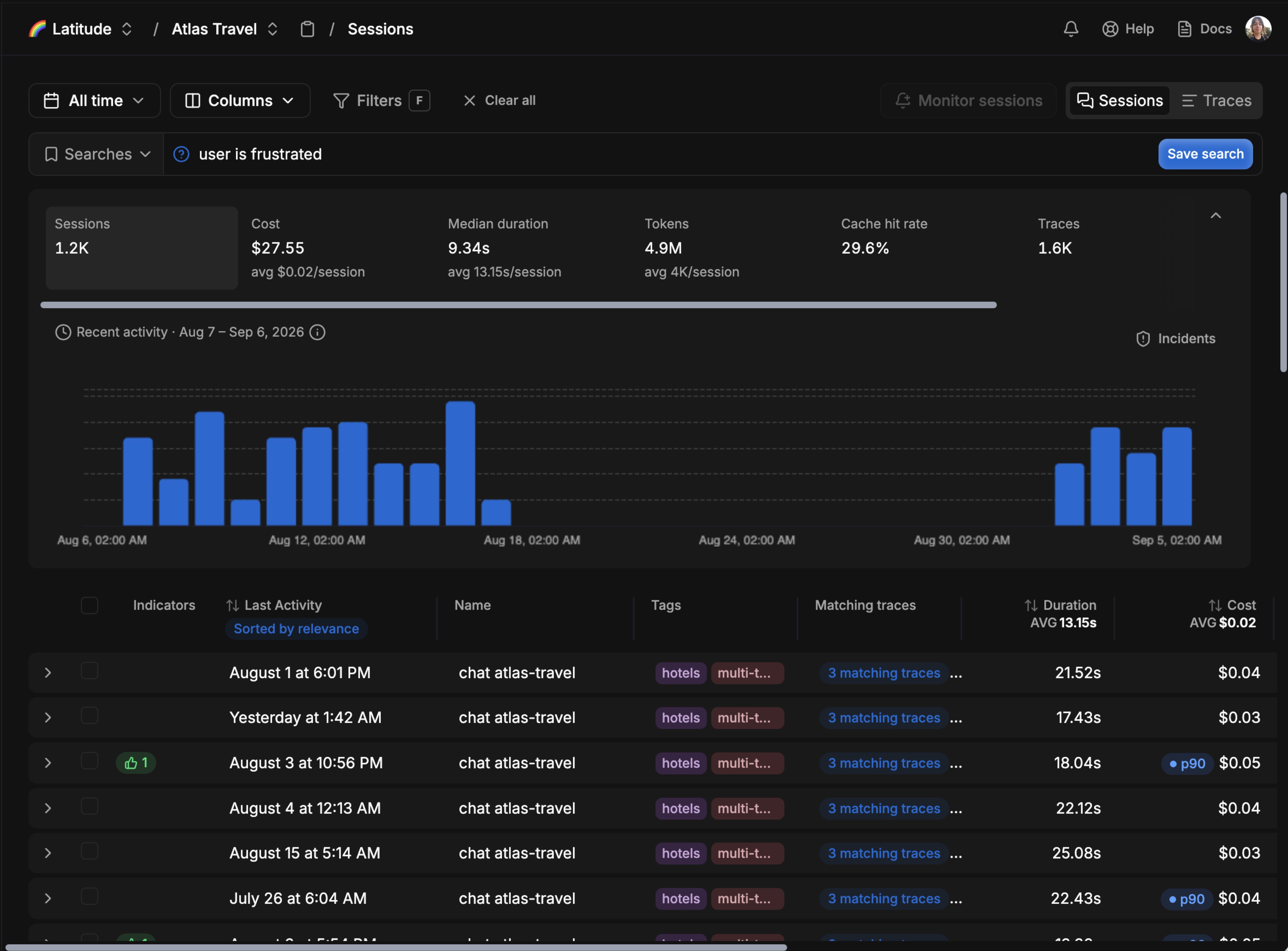
In this Atlas Travel example, the search query is simply user is frustrated. Latitude searches the indexed conversation turns by meaning and ranks the matching sessions by relevance. The result list keeps the full sessions attached to the match, including their matching traces, tags, duration, and cost, so an engineer can move from the semantic query to the underlying evidence without losing the conversation context.
The screenshot also shows why the search result should be treated as a candidate set rather than a finished metric. The query surfaces sessions that may express frustration even when they do not use the word itself. A person still needs to open representative sessions and inspect the matching traces before saving the search or using its count as a monitoring signal. The visible result set can support that review, but it does not establish a measured precision or recall rate, so none is claimed here.
FAQ
Does plain-English search over conversation logs send my data to an LLM every time I search? No, not in a well-built system. The query and the stored conversations get embedded once, ahead of time, into a vector index. A search compares the query’s embedding against that index using cosine similarity, a fast, deterministic calculation, rather than a fresh LLM call over your data on every keystroke.
Can semantic search alone tell me if a conversation was a real failure? No. Semantic search retrieves conversations whose meaning plausibly matches your query. Whether a matched conversation is actually a failure, and why, is a separate judgment that needs a human read, an annotation, or an evaluation score checked against the underlying trace.
Why not just chunk conversations by a fixed number of tokens instead of by turn? A fixed-token chunk can split a sentence or a turn in half, which breaks the unit of meaning you are trying to embed. Chunking at the turn boundary keeps “what the user said” and “what the assistant said” intact as searchable units, which matters most for meta-meaning queries like frustration or refusal that live inside a single turn’s phrasing.
What is the difference between a saved search and a Signal? A saved search reruns the same query and tells you about new matches. A Signal is built from failed scores across annotations, flaggers, evaluations, and custom checks, gets a name, examples, a trend, and a lifecycle, and can generate its own monitoring evaluation. A saved search watches a question. A Signal tracks a problem.
Does exact-phrase search replace semantic search? No, they answer different questions. Exact-phrase search is for when you know the specific wording that matters: an error code, a tool name, a policy phrase. Semantic search is for when you know the concept but not the wording. Most real investigations combine both in one query.
How do I know if my query is too broad or too narrow? Check hard negatives on purpose: sessions that are topically close but should not match. If they show up in your results, the query is too broad. Then check just below your relevance cutoff for sessions that clearly should have matched but did not. If you find them, the query or the relevance floor is too narrow.