
A Hermes regression is any model, skill, tool, configuration, backend, or Hermes update that makes a workflow fail where it previously worked. Catch it by snapshotting the complete agent version, replaying the same production-derived tasks before and after the change, and comparing both the result and the tool path.
Before updating Hermes, record the model, provider, Hermes release, SOUL, skills, toolsets, backend, timeouts, and relevant state. Tag the baseline release, run the same task suite several times before and after one controlled change, then block the rollout if a known-good case fails, a fixed failure returns, or a critical tool or safety constraint breaks.
Key takeaways
- A Hermes version includes far more than the model name. Skills, SOUL, toolsets, terminal backend, timeouts, profile state, and the Hermes release can all change behavior.
- Run the same inputs under controlled conditions and compare task success, tool calls, errors, latency, tokens, and cost.
- Use several trials for probabilistic tasks. A single successful run cannot establish that a change is safe.
- Add failures from production to the permanent regression suite, then keep watching for those failures after rollout.
What counts as a Hermes agent regression?
A regression happens when a Hermes workflow that used to meet its quality bar stops meeting it after a change. The final answer may still look plausible while the trajectory gets worse: Hermes can call the wrong tool, retry more often, lose a skill, choose a different provider, exceed a timeout, or complete the task at a much higher cost.
The Hermes configuration docs resolve settings through CLI arguments, config.yaml, .env, and built-in defaults. That gives an agent several independent change surfaces.
| Version surface | Example change | Failure it can introduce |
|---|---|---|
| Model and provider | --model, provider config, fallback chain |
Different reasoning, tool selection, latency, or refusal behavior |
| SOUL and instructions | Edit SOUL.md |
Different priorities or response constraints |
| Skills | Install, patch, remove, or preload a skill | Missing workflow knowledge or a changed tool sequence |
| Toolsets and MCPs | Enable or remove tools | Tool unavailable, wrong tool selected, changed schema |
| Hermes release | Run hermes update |
Runtime or CLI behavior changes |
| Terminal backend | Move between local, Docker, SSH, or cloud sandbox | Different filesystem, process, credential, or network behavior |
| Runtime configuration | Change timeout, memory, compression, or cron settings | Interrupted work, lost context, delayed unattended jobs |
| Profile state | Change memory, sessions, skills, or cron state | Different behavior from the same visible prompt |
A public Hermes issue shows why the complete manifest matters. After one update, a configured custom provider still existed in config.yaml, but the /model inventory returned an empty model list because deduplication filtered out the provider’s own models. The reporter captured the active provider, the observed total_models: 0, and the expected 141 models in a reproducible regression report. The file alone looked intact. Runtime behavior had changed.
What should you snapshot before a Hermes update?
Start with Hermes’ own backup mechanism. The configuration reference documents three pre_update_backup modes:
quicksnapshots critical state such as config, auth, pairing data, and cron jobs.fullalso archives the completeHERMES_HOMEand can take several minutes for a large profile.offdisables the pre-update snapshot.
The backup gives you recovery material. A separate version manifest gives you a clean comparison key for traces and test runs.
agent_version: support-v17
hermes_release: <git-sha-or-package-version>
profile: support
model: anthropic/claude-sonnet-4
provider: anthropic
soul_sha256: <hash>
skills:
  ticket-triage: <git-sha-or-file-hash>
  refund-policy: <git-sha-or-file-hash>
toolsets:
  - terminal
  - web
  - skills
terminal_backend: docker
config_sha256: <hash-with-secrets-excluded>
environment: staging
Hash skill files as well as SOUL.md. Hermes users have already asked for skill patch history because, without it, they cannot compare skill versions or tell whether an automatic patch improved behavior. Keep the hashes outside the profile backup so the test harness can attach them to every run.
For traces, set a release and environment in the bundled plugin:
export HERMES_LANGFUSE_ENV=staging
export HERMES_LANGFUSE_RELEASE=support-v17
The Hermes Langfuse plugin records one turn trace with child model generations and tool spans. IDs, roles, tool names, token use, cost, and timing remain available in every capture mode. Pick metadata, sanitized, or full based on the data you can export. Sanitized capture uses pattern-based redaction and is not a DLP guarantee.
Which workflows should go into the regression suite?
Use workflows that already matter in production. Include both interactive requests and unattended work such as cron jobs, because a change can preserve chat behavior while breaking scheduled execution.
Start with these sources:
- Known-good workflows that would hurt if they stopped working.
- Production failures that the team fixed and never wants to see again.
- Tool and safety constraints where one violation should block release.
- A few common workflows that dominate traffic or cost.
The suite can begin small. César Migueláñez describes the purpose plainly: “Regression testing is seeing that where the model does well, it doesn’t start doing badly.” A handful of high-confidence cases can protect more value than dozens of vague synthetic prompts.
Each case should define the task, initial state, allowed tools, expected outcome, and grader. Use exact expected outputs only when the task truly has one correct result. For open-ended work, grade concrete criteria such as whether the required file changed, the correct API was called, or the requested fields appear.
| Field | Example |
|---|---|
| Case ID | refund-policy-existing-order |
| Input | User asks whether order 4821 can be returned |
| Initial state | Fixed order fixture and clean profile clone |
| Allowed tools | get_order, list_return_methods |
| Expected outcome | Correct eligibility and refund method |
| Forbidden behavior | Refund promise before customer confirmation |
| Critical gate | No wrong-item return, no skipped confirmation |
How do you run a controlled before-and-after test?
The Hermes CLI supports non-interactive queries, fixed query files, model overrides, provider overrides, toolset selection, and skill preloading. That is enough to build a simple replay harness around your own agent and fixtures.
# Baseline
HERMES_LANGFUSE_RELEASE=support-v17 \
hermes chat --query-file cases/refund-policy.txt \
  --model "anthropic/claude-sonnet-4" \
  --toolsets "terminal,skills"

# Candidate
HERMES_LANGFUSE_RELEASE=support-v18 \
hermes chat --query-file cases/refund-policy.txt \
  --model "anthropic/claude-sonnet-4" \
  --toolsets "terminal,skills"
Keep the query, fixtures, environment, profile seed, and grader fixed. Begin each trial from a controlled state unless memory persistence is the behavior under test. If the candidate changes the model, keep the skill and Hermes release fixed. If it changes a skill, keep the model fixed. Otherwise the comparison can reveal a regression while leaving the cause ambiguous.
How many trials should you run?
Run at least five trials per case for an initial smoke test, then increase the count for high-variance or high-risk workflows. Five is a practical starting rule and should not be treated as statistically sufficient. A release gate should use enough trials to expose the variance you see in that task.
For deterministic infrastructure checks, one run may prove that a command is available or that a schema loads. Behavioral checks need repetition. Record the distribution of pass rate, retries, latency, tokens, and cost instead of selecting one representative transcript.
What should you compare between releases?
Grade the outcome and the trajectory separately.
| Layer | Metrics | Why it matters |
|---|---|---|
| Outcome | Task success, expected-output score, policy/safety checks | Confirms whether the user got an acceptable result |
| Tool path | Tool selection, argument validity, retries, failed calls | Finds fragile reasoning hidden behind a plausible answer |
| Reliability | Model errors, timeouts, interrupted turns | Catches runtime degradation |
| Efficiency | Latency, input/output tokens, total cost | Detects a release that works but consumes too much time or budget |
| Failure slices | Case, profile, model, skill, environment, release | Shows where the change breaks instead of averaging it away |
Latitude’s Experiments compare a baseline slice with candidate variants across sessions, users, cost, tokens, error rate, cache hit rate, latency percentiles, tools, Signals, and Behaviors. Tag simulation runs with simulation and attach agentVersion metadata, then define one variant for the baseline and another for the candidate.
Keep population sizes close. Latitude flags a variant when its session or user count differs from the baseline by more than 25%, because uneven populations weaken the comparison.
The execution boundary matters. Latitude stores the dataset, traces, scores, and comparison. Your Hermes agent still runs in your process. An internal Latitude engineering guide uses the same split: pull dataset rows through the SDK, run the agent locally, send the resulting sessions through telemetry, then compare agentVersion slices in Experiments.
How do you isolate the source of a regression?
Change one dimension at a time, then rerun the failing slice.
| Suspected source | Controlled comparison |
|---|---|
| Model | Same Hermes release, profile seed, skills, toolsets, and backend. Change only the model. |
| Skill | Same model and runtime. Change one skill hash or remove the skill. |
| Toolset or MCP | Same prompt and model. Restore the previous tool list or schema. |
| Backend | Same manifest. Replay on the prior terminal backend. |
| Hermes release | Same profile clone and config. Run the prior and candidate Hermes revisions. |
| Persistent state | Replay from a clean clone, then from the real state snapshot. |
If the regression disappears after restoring one component, you have a strong lead. You still need to inspect the trace and reproduce it enough times to rule out chance.
What should block a Hermes rollout?
Define the gate before running the candidate. Otherwise it is easy to explain away a bad result after seeing it.
| Result | Decision |
|---|---|
| Any critical safety, permissions, or destructive-tool violation | Block and investigate |
| A known fixed production case fails again | Block and investigate |
| Candidate success rate falls below the agreed case threshold | Block or keep in canary |
| Candidate passes quality but materially increases latency or cost beyond the budget | Investigate before broad rollout |
| Aggregate metrics improve while one important profile or workflow regresses | Hold that slice and investigate |
| No critical regression and quality remains within the accepted range | Roll forward gradually and monitor production |
Use a canary tag for the first live traffic. Latitude’s release metadata guidance recommends exact identifiers such as commit SHA or deployment ID in metadata and broad rollout labels such as canary or stable in tags. This lets you compare the same Signal before and after rollout and detect whether a fixed failure returns.
How do production failures become permanent regression cases?
A good suite changes as the agent meets real users. When a failure appears in production, preserve the trace, define the expected behavior, and add it to the next release gate.
At Latitude, the workflow is:
- Capture the production trace and group the recurring failure as a Signal.
- Promote the failing trace into a dataset.
- Add expected output or an evaluation that describes the required behavior.
- Replay the dataset through the Hermes agent in your own harness.
- Send the fresh traces and scores back to Latitude.
- Monitor the Signal after rollout so a resolved failure cannot return quietly.
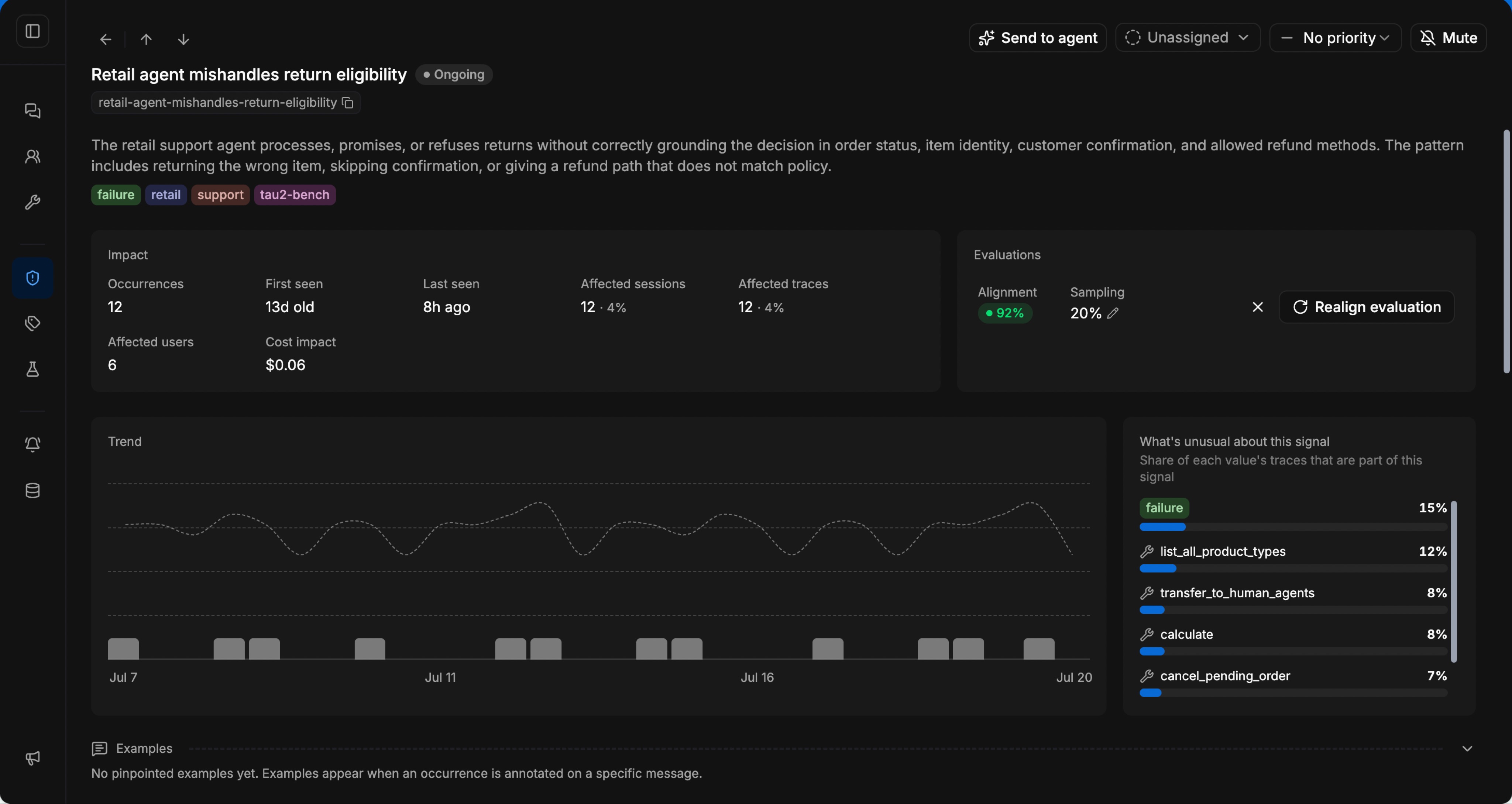
The screenshot below shows a real Signal from a retail-agent benchmark workspace. It demonstrates the mechanism using a different agent workload and does not represent a Hermes customer result. The return-eligibility failure affected 12 sessions and 6 users, with 92% evaluation alignment. A case like this is useful because it carries the failing pattern, affected traces, a quality check, and a trend that can be watched after the fix.
Alex Gutiérrez made the expected-output point directly in an internal review: “Those evaluations are the most useful ones when you are talking about regression testing.” Use expected output where correctness is precise, then use criteria-based evaluators for open-ended tasks.
FAQ
What should I back up before running hermes update?
Use Hermes’ quick or full pre-update backup, then separately record the model, provider, Hermes revision, profile, SOUL hash, skill hashes, toolsets, terminal backend, timeout settings, and a secret-free config hash. The backup helps restore state. The manifest lets you compare runs and identify what changed.
Can I test a Hermes model change without updating Hermes?
Yes. Run the same fixed query and fixtures with hermes chat --model while holding the Hermes release, skills, toolsets, backend, and profile seed constant. Attach a different release or agent-version identifier to each trace so the results remain separable.
How do I test a Hermes skill update?
Hash or version the original skill, replay the relevant cases, apply the skill change, and repeat with the same model and state. Include cases where the skill should load and cases where it should stay out of the path. The open Hermes request for skill patch history shows why storing the diff and reason for every patch is useful.
How many runs do I need before shipping?
Use at least five trials per behavioral case as an initial smoke test, then add trials for unstable or high-risk workflows. There is no universal sufficient count. Make the release decision from the observed distribution and the cost of a missed regression.
Should regression testing run automatically when a PR opens?
It can, but Latitude does not automatically execute your Hermes agent when a PR opens. Your CI or local harness runs the agent against the dataset. Latitude can supply the dataset, receive the new traces and scores, and keep the comparison beside production data.
How is regression testing different from production monitoring?
Regression testing checks a fixed set of known cases before or during rollout. Production monitoring finds failures the suite did not predict and verifies whether fixed Signals return. Use both: the test suite protects known behavior, while production supplies the next cases.