

Large language models (LLMs) are too big for a single GPU, even cutting-edge ones like NVIDIA’s A100 or H100. To handle models with 70 billion or more parameters, you need multiple GPUs. But here’s the catch: splitting models across GPUs creates communication bottlenecks. Without high-speed interconnects like NVLink or InfiniBand, performance drops due to slow data transfers.
Key Takeaways:
-
Why Multi-GPU Setups Matter: Single GPUs can’t handle massive LLMs.
-
Challenges: Communication overhead between GPUs slows performance.
-
Solutions: High-speed interconnects (e.g., NVLink, InfiniBand) and optimized parallelism strategies reduce bottlenecks.
-
Best Practices: Use tensor or model parallelism within nodes (via NVLink) and data parallelism across nodes. Tools like Hugging Face Accelerate, Alpa, and vLLM simplify scaling.
-
Hardware Choices: NVIDIA A100 (40–80 GB) and H100 (80 GB HBM3) are ideal for large models. H100 offers better performance but costs more.
Multi-GPU Architecture and Hardware Components
When you distribute a large language model (LLM) across multiple GPUs, the hardware setup becomes a critical factor in determining whether your system performs at its peak or struggles with bottlenecks. A typical multi-GPU node includes high-performance GPUs like NVIDIA A100 or H100 , a CPU with enough PCIe lanes to handle GPU communication, interconnects for GPU-to-GPU communication, system memory, and fast storage. Each component plays a role: GPU memory limits model size, interconnect bandwidth governs data transfer speeds, and storage affects how quickly you can load checkpoints. Together, these elements lay the groundwork for understanding how advanced interconnects and memory management impact performance.
GPU Interconnects: NVLink, InfiniBand, and Ethernet
NVLink is NVIDIA’s high-speed connection for GPUs within a single server. Often paired with NVSwitch, it enables all-to-all GPU communication at hundreds of gigabytes per second per GPU. This makes it feasible to split layers across GPUs without stalling on data transfers, a key requirement for tensor and model parallelism. For connecting multiple servers, InfiniBand offers ultra-low latency (measured in microseconds) and speeds exceeding 400 Gbps per link. It’s the backbone of large AI clusters, where synchronizing gradients or parameters across dozens - or even hundreds - of nodes is essential. On the other hand, Ethernet is a more affordable and widely used option but comes with higher latency and lower bandwidth. While it works for smaller setups, it’s less efficient for the tightly coupled workloads that LLMs demand.
Relying solely on PCIe for communication can quickly become a performance bottleneck. The overhead from data transfers can significantly reduce compute efficiency, forcing teams to use techniques like quantization or offloading to fit models within individual GPU memory limits.
Memory Hierarchies and Constraints
GPU memory is where critical data - like model weights, key-value caches, and activations - resides. Consumer GPUs such as the RTX 4090 typically offer 16–24 GB of VRAM. This is sufficient for models with 7B to 13B parameters in FP16 precision or even larger models with 4-bit quantization. However, these GPUs struggle with handling models like 65B or 70B+ parameters unless you split the workload across multiple GPUs or use aggressive compression techniques. In contrast, enterprise GPUs like the NVIDIA A100 (40 GB or 80 GB) and H100 (80 GB HBM3) provide the capacity to host 30B–70B models on a single GPU with quantization or run 175B+ models using multi-GPU setups with tensor or pipeline parallelism.
Beyond GPU memory, L2/L1 caches and registers play a crucial role in how efficiently kernels reuse data. Optimized libraries like CUTLASS take advantage of these caches to improve throughput. When GPU memory isn’t enough, CPU RAM serves as a slower, larger memory tier for tasks like loading models or offloading less active layers. However, crossing the boundary between GPU memory and CPU RAM during token-by-token decoding can severely impact real-time performance. To avoid this, it’s best to keep active layers and key-value caches entirely within GPU memory. If memory constraints arise, techniques like quantization or limiting sequence length are often better strategies than relying on host memory swapping.
Intra-node vs. Inter-node Connections
Intra-node connections - such as NVLink, NVSwitch, or PCIe - determine how efficiently a model can be divided across GPUs within a single server. NVLink’s combination of high bandwidth and low latency makes it ideal for tensor and model parallelism within a node. On the other hand, inter-node connections - like InfiniBand or Ethernet - are used to link multiple servers. These connections have higher latency and are more prone to congestion, making them better suited for data parallelism (with less frequent gradient synchronization) or coarse-grained pipeline parallelism, where only boundary activations are exchanged between nodes.
For U.S.-based production environments, it’s recommended to use tensor or model parallelism within NVLink-connected nodes and data parallelism across nodes. Keeping latency-sensitive traffic on the fastest links ensures real-time performance, while using InfiniBand or high-speed Ethernet for occasional synchronization minimizes overhead. Cloud providers often offer specific configurations, such as 8×H100 with NVLink or 8×H100 over PCIe. While NVLink setups may cost more per hour, they often reduce overall expenses by improving utilization and requiring fewer nodes. Platforms like Latitude can help teams compare hardware setups by tracking metrics like tokens per second, latency, and cost, enabling you to choose a configuration that balances performance and simplicity.
Data Parallelism vs. Model Parallelism
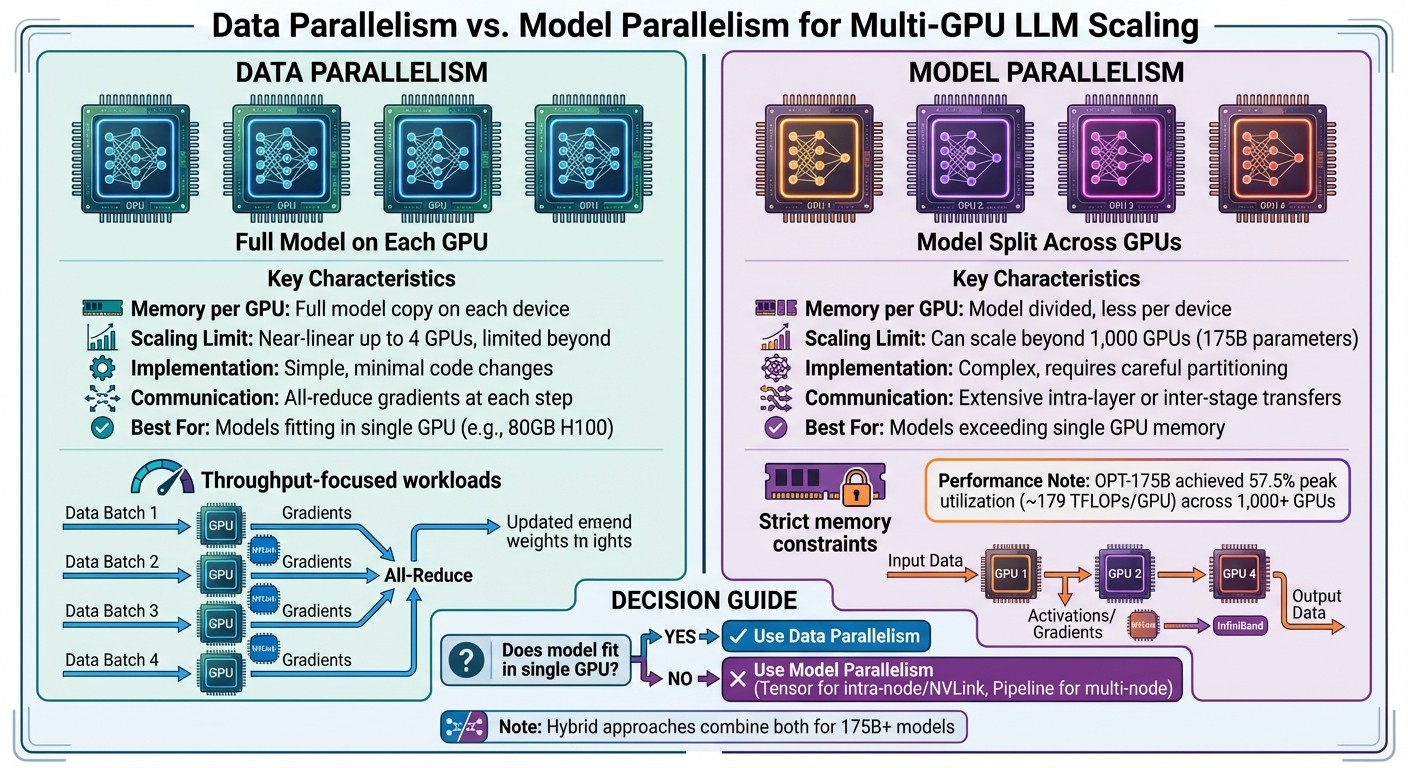
Data Parallelism vs Model Parallelism for Multi-GPU LLM Scaling
Once you’ve set up the right hardware, the next step is deciding how to distribute the workload for your large language model (LLM). Two main approaches are data parallelism and model parallelism.
In data parallelism , the entire model is duplicated across multiple GPUs. Each GPU processes different batches of input data using identical copies of the model. The results are then synchronized - either by aggregating gradients during training or combining outputs during inference. On the other hand, model parallelism splits the model itself across GPUs, which reduces the memory load on each device. This method becomes essential for models too large to fit on a single GPU.
Data Parallelism: Pros and Cons
Data parallelism is relatively easy to implement. Most deep learning frameworks support it with minimal coding effort. It also scales well - up to about four GPUs - delivering nearly linear increases in throughput. Beyond this point, however, communication overhead can start to diminish returns. To make this approach work, you’ll need to ensure your global batch size can be increased without affecting model performance and that your GPUs are interconnected with high-speed links like NVLink or InfiniBand.
For smaller LLMs that can fit comfortably on a single GPU (such as those running on A100 or H100 GPUs with 40–80 GB of memory), data parallelism often provides the best balance between performance and complexity. It works well for both training and high-throughput inference.
However, there are limitations. Since each GPU holds a full copy of the model weights and optimizer state, adding more GPUs doesn’t reduce memory usage per device. This becomes problematic for extremely large models, especially those exceeding 100 billion parameters. Synchronizing gradients across GPUs at every training step can also strain even the fastest interconnects. Additionally, optimizers like Adam, which require multiple state tensors per parameter, further increase memory demands. For such massive models, pure data parallelism becomes impractical without additional techniques.
If your model size surpasses the memory limits of a single GPU, model parallelism is the next step.
Model Parallelism: Handling Memory Demands
Model parallelism addresses memory constraints by dividing the model’s parameters and computations across GPUs. One common method is tensor (intra-operator) parallelism , which splits large operations - like those in attention and feedforward layers - across devices. This approach relies on collective operations, such as all-reduce or all-gather, and works best when GPUs are tightly connected via NVLink.
Another method is pipeline parallelism , which breaks the model into sequential stages, assigning each stage to a different GPU. Microbatches are then streamed through these stages, similar to an assembly line. While this reduces memory usage per GPU and improves hardware utilization, it introduces challenges like pipeline bubbles and added communication overhead.
For inference, model parallelism can increase latency in low-batch, single-request scenarios because each token generation step involves inter-GPU communication. However, in high-throughput inference scenarios, it enables the use of much larger models and longer context windows by pooling memory and compute resources across GPUs. For example, benchmarks using Alpa on Ray with OPT-175B on NVIDIA clusters demonstrated scaling across more than 1,000 GPUs, achieving peak hardware utilization of roughly 57.5% (≈179 TFLOPs per GPU). Achieving this requires careful partitioning, load balancing, and communication scheduling, often with cluster-aware placement using specialized frameworks.
Comparing Data and Model Parallelism
| Aspect | Data Parallelism | Model Parallelism |
|---|---|---|
| Memory per GPU | Each GPU holds a full copy of the model | The model is split across GPUs; less memory per device |
| Scaling Limit | Nearly linear scaling up to 4 GPUs; limited by communication beyond that | Can scale beyond 1,000 GPUs for 175B-parameter models |
| Implementation | Simple; minimal changes from single-GPU setup | Complex; requires careful partitioning and orchestration |
| Communication | All-reduce gradients across GPUs at each step | Extensive intra-layer or inter-stage communication |
| Best Use Case | Models that fit within a single GPU’s memory; throughput-focused workloads | Models exceeding single GPU memory; strict memory constraints |
This table highlights when each strategy works best, depending on your model size and hardware setup.
For smaller models that fit entirely on one GPU (e.g., 80 GB H100s), data parallelism is often the go-to choice due to its simplicity and efficient scaling. But when a model can’t fit on a single GPU - even with optimizations like mixed precision or activation checkpointing - model parallelism becomes necessary. Tensor parallelism is usually preferred for GPUs within the same node connected via NVLink, while pipeline parallelism is better suited for setups spanning multiple GPUs or nodes.
For extremely large models, such as those at the OPT-175B scale, hybrid approaches combining data, tensor, and pipeline parallelism are often used to maximize resource efficiency. Tools like Latitude can simplify managing these strategies, allowing engineers to focus on parallelization while domain experts refine LLM features.
Optimizing Inference Performance in Multi-GPU Setups
After selecting your parallelism strategy, the next step is to fine-tune inference for production use. Whether you’re managing a real-time chatbot or processing massive text batches, optimizing multi-GPU inference is about finding the right balance between latency, throughput, and resource use. High-speed interconnects like NVLink, as mentioned earlier, play a critical role in reducing communication delays. The trick lies in tailoring your workload distribution strategy to meet the specific demands of your application.
Workload Distribution for Real-Time Applications
Real-time systems, such as chatbots and APIs, require low latency and consistent response times. For these scenarios, data parallelism is often the go-to choice. Each GPU runs a full copy of the model and handles separate user requests, avoiding the per-token communication delays that come with model parallelism. This keeps response times steady and predictable.
Metrics like Time to First Token (TTFT) and Inference Time per Latency (ITL) are essential for monitoring performance. For instance, during high-traffic events like product launches or peak hours, a well-optimized system might scale GPU replicas by 50% to handle the increased demand for prefill operations. Once the traffic subsides, resources can be reallocated accordingly. For models that are too large to fit on a single GPU, splitting the prefill and decode stages across separate GPU pools can be a game-changer. This setup allows the compute-heavy prefill stage and memory-intensive decode stage to be optimized independently. When requests vary in size or timing, dynamic batching becomes a crucial tool for maintaining efficiency.
Batch Processing and Dynamic Batching
Dynamic batching is key to maximizing throughput in multi-GPU setups. By grouping multiple inference requests into a single forward pass, you can significantly increase GPU utilization. Tools like TensorRT-LLM, vLLM, and Triton Inference Server can improve token throughput by 2–4× compared to processing individual requests one at a time.
However, challenges arise when requests have diverse arrival times or varying input/output lengths. Continuous batching offers a solution by allowing new requests to join in at every decode step rather than waiting for the entire batch to finish. This keeps GPUs busy without causing unnecessary delays for earlier requests.
Managing memory efficiently is another critical factor. The Key-Value (KV) cache, which stores data from previous tokens, can quickly eat up GPU memory when dealing with multiple sessions or long context windows. If the KV cache overflows, it can lead to costly re-computations or even inference errors. Frameworks like vLLM address this with features like PagedAttention, which treats the KV cache as virtual memory, enabling much larger batch sizes without overwhelming the hardware.
Performance Benchmarks and Communication Overhead
After refining workload distribution and batching strategies, it’s important to consider how interconnect speeds and scheduling affect performance. Benchmarks show the potential for dramatic improvements. For example, research on cluster-based inference demonstrated a 98.1% reduction in execution time - going from 11.4 hours to just 13.1 minutes - when using opportunistic GPU scheduling compared to single-GPU setups. While training scales nearly linearly up to four GPUs, inference latency is far more sensitive to communication overhead beyond that point.
The impact of communication bottlenecks depends heavily on the interconnect technology in use. NVLink, for instance, offers much higher bandwidth within a node compared to Ethernet. This is why tensor parallelism performs better within a single node than across multiple nodes. When working across nodes is unavoidable, combining tensor parallelism within nodes with pipeline parallelism between nodes can help minimize cross-node traffic.
Ultimately, the practical limits of scaling aren’t just about the number of GPUs but also about avoiding communication bottlenecks. Profiling tools like NVIDIA Nsight Systems and the PyTorch profiler can help identify whether your performance is constrained by computation, memory bandwidth, or communication delays. For example, if interconnect saturation occurs while GPUs are underutilized, adjusting tensor parallelism or redistributing shards might help. On the other hand, if GPUs are idle and latency is within acceptable limits, increasing the batch size or adding more concurrent streams can further enhance throughput.
Tools and Frameworks for Multi-GPU Scaling
Once you’ve optimized inference performance, the next step is choosing tools that simplify multi-GPU scaling. These tools provide streamlined solutions to bridge the gap between raw hardware capabilities and efficient deployment of large language models (LLMs).
Hugging Face Accelerate: A Simplified Approach to Scaling
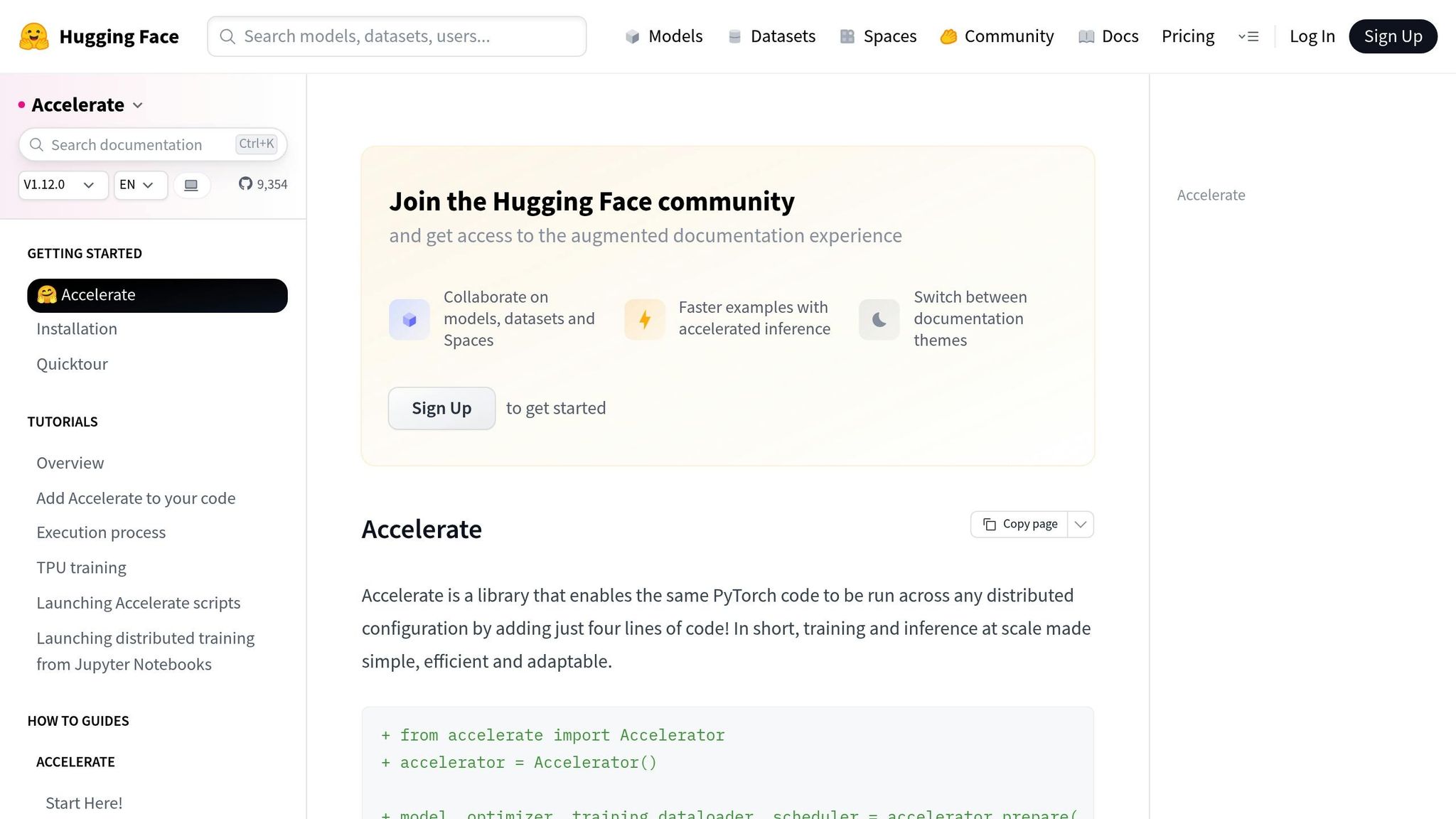
For PyTorch users looking to scale from single to multi-GPU setups, Hugging Face Accelerate is a game-changer. It allows you to scale without needing to rewrite your code, thanks to its straightforward Accelerator API. This framework takes care of tasks like device placement, gradient synchronization, and mixed precision training, all while requiring only minor code adjustments.
Accelerate supports both data parallelism and distributed data parallelism, whether you’re working with a single node or multiple nodes. It integrates effortlessly with libraries like Transformers and Diffusers, wrapping existing models, optimizers, and data loaders without requiring any changes to your model architecture. Plus, its built-in utilities for launching and configuring setups eliminate the hassle of manually managing torch.distributed.init_process_group.
For multi-GPU inference, Accelerate can shard tensors, map devices, and coordinate generation across multiple GPUs. Benchmarks show near-linear speedup up to four GPUs for many workloads. However, as with most systems, communication overhead can limit additional gains when scaling beyond that point. If you’re looking for a quick and efficient way to experiment with multi-GPU setups, Accelerate is an excellent choice.
Advanced Options: Alpa and vLLMs
When scaling requires more GPUs or deeper optimization, specialized frameworks like Alpa and vLLM step in.
Alpa is an open-source system built on JAX, designed to automatically determine the best parallelization strategies for large neural networks. With just a single decorator added to JAX functions, Alpa configures data, tensor, and pipeline parallelism for you.
Using Ray for cluster orchestration and a DeviceMesh abstraction, Alpa maps computation partitions to physical hardware in a way that minimizes communication bottlenecks across NVLink, InfiniBand, or Ethernet connections. On NVIDIA’s Selene supercomputer, Alpa scaled OPT-175B training to over 1,000 GPUs , achieving about 57.5% of peak hardware FLOPs - roughly 179 TFLOPs per GPU. This high level of automation reduces the risk of inefficient configurations and saves valuable engineering time.
For production inference, vLLM stands out as the preferred tool for high-throughput, low-latency serving. Its standout feature, PagedAttention , treats the KV cache like virtual memory pages, significantly improving GPU memory utilization. This enables larger batch sizes and higher token throughput compared to standard Hugging Face Transformers servers. With support for multi-GPU parallelism, continuous batching, and OpenAI-compatible APIs, vLLM has become a go-to framework for teams looking to scale inference while maintaining performance.
Latitude: Streamlining LLM Development
While tools like Accelerate, Alpa, and vLLM handle hardware optimization, Latitude focuses on the development side - managing prompt design, evaluation, and deployment. As an open-source platform for AI engineering, Latitude enables seamless collaboration between domain experts and engineers, keeping the focus on creating and refining AI-driven features without getting bogged down by infrastructure.
Latitude offers features like versioned prompt management, review tools, and experimentation capabilities. It integrates with frameworks like vLLM or Accelerate rather than replacing them, treating them as the execution layer. By separating hardware acceleration from feature development, Latitude allows teams to focus on delivering reliable, user-ready AI solutions.
Next, we’ll dive into hardware selection and scaling strategies to further enhance your multi-GPU deployments.
Hardware Selection and Scaling Considerations
Once you’ve got the right tools lined up, the next step is picking hardware that fits both your workload needs and your budget. Your choice of GPU and scaling approach will directly impact whether your model deployment runs smoothly or hits roadblocks. Here’s a breakdown of the key hardware options and scaling strategies to help you get the most out of your setup.
Choosing the Right GPU: A100, H100, and Beyond
When it comes to GPUs, memory and interconnect capabilities are critical. Gaming and workstation GPUs, with their 16–24 GB of VRAM, just won’t cut it for production-level large language models (LLMs). For models ranging from 7 billion to 70 billion parameters, the NVIDIA A100 is a solid option, offering 40 GB and 80 GB HBM2e variants. For more demanding tasks, the H100 steps up with 80 GB of HBM3 memory and 4th-generation NVLink, delivering faster bandwidth and improved tensor-core performance for formats like BF16 and FP8. And if you’re working with models nearing or exceeding 175 billion parameters, the H200 pushes the envelope with even greater HBM capacity and bandwidth, making it a go-to for trillion-parameter models and extended context windows.
Instead of focusing solely on the upfront cost, think about cost per token. While H100 instances are typically 1.5–2 times more expensive per hour than A100 instances in major cloud environments, they often deliver higher throughput and faster training times, which can actually lower your overall expenses. When budgeting in USD, factor in hourly GPU rates, tokens per second, and operational costs like power and cooling. Newer GPUs like the H100 and H200 often offer better energy efficiency, which can trim down ongoing expenses. For example, NVIDIA’s Selene-cluster benchmarks showed that Alpa on Ray scaled an OPT-175B model across more than 1,000 GPUs, achieving about 57.5% of peak hardware FLOPs - roughly 179 TFLOPs per GPU.
Horizontal vs. Vertical Scaling
Vertical scaling involves using fewer but more powerful GPUs. This approach simplifies parallelism and minimizes communication overhead, making it ideal for scenarios where models are pushing the limits of single-GPU memory or require low-latency inference. Upgrading from an A100 to an H100 or H200 can remove the need for complex sharding and reduce operational risks - fewer GPUs mean fewer potential failure points and less cluster management hassle.
On the other hand, horizontal scaling - adding more GPUs - works well for highly parallel workloads like large-batch offline inference or data-parallel training. For example, one study found that shifting from a single high-end GPU to a cluster reduced execution time by 98.1%, cutting it down from 11.4 hours to just 13.1 minutes. However, as GPU counts grow, communication overhead - such as all-reduce operations and parameter synchronization - can limit scaling efficiency. If you have access to cost-effective mid-range GPUs and robust tools for tensor or pipeline parallelism, horizontal scaling can deliver better throughput for your dollar. Just keep in mind that this approach requires investment in orchestration and monitoring tools.
Once you’ve settled on a scaling strategy, the next step is to optimize your interconnects and cluster design.
Network Topology and Cluster Management
Fast intra-node communication is essential for efficient scaling. Leverage NVLink for intra-node connections, as it’s significantly faster than inter-node options. Many parallelization strategies rely on this speed, so it’s best to design clusters that keep resource-heavy operations - like tensor parallelism - within NVLink-connected GPU groups. Meanwhile, lighter or asynchronous tasks can be handled over slower inter-node links. For multi-node setups, pairing servers with full NVLink connectivity and high-bandwidth fabrics like HDR or NDR InfiniBand is crucial.
Topology-aware tools like DeviceMesh can map your cluster into a logical grid, ensuring that model partitions are placed on GPUs with the fastest mutual connections. This minimizes traffic over slower inter-node links. Such tools also make it easier to use heterogeneous clusters, like mixing A100 and H100 GPUs, as long as you group similar GPUs and high-bandwidth links together. Monitoring metrics like per-GPU utilization, interconnect throughput, and all-reduce times can help you make informed decisions about when to upgrade to larger GPUs (vertical scaling) or add more nodes (horizontal scaling). For teams managing shared clusters or experimenting with different deployment setups, platforms like Latitude can streamline coordination, allowing AI engineers to focus on their workloads without getting bogged down by infrastructure complexities.
Conclusion
Hardware acceleration plays a critical role in deploying large language models (LLMs) at production scale. Modern LLMs quickly exceed the memory and compute capacity of a single GPU, making multi-GPU setups equipped with high-end NVIDIA GPUs - like the A100, H100, or H200 - and fast interconnects indispensable for large-scale training and inference. However, simply adding more GPUs isn’t enough. High-speed interconnects such as NVLink, InfiniBand, or high-speed Ethernet are necessary to minimize communication bottlenecks.
Different parallelism strategies address these challenges. Data parallelism replicates the entire model across GPUs and splits incoming data batches, which works well for models that fit within a single GPU’s memory. For larger models, model parallelism and pipeline parallelism distribute the workload across multiple GPUs. These approaches enable scaling to massive models but require careful placement of tasks to optimize performance. For many U.S.-based teams, a hybrid approach - balancing memory constraints, latency, and throughput - proves to be the most effective solution.
On top of the hardware and parallelism strategies, software frameworks simplify deployment. Tools like Hugging Face Accelerate, Alpa, and vLLM automate key processes such as partitioning, device placement, and orchestration. This allows teams to focus on building and refining products rather than managing complex distributed systems. Platforms like Latitude further streamline workflows by enabling collaborative design of prompts, evaluation methods, and deployment configurations - all while integrating seamlessly with multi-GPU infrastructure.
Managing operational costs alongside hardware performance is another critical consideration. Selecting GPUs should go beyond upfront costs to include factors like total cost of ownership, which encompasses per-token expenses, power consumption, cooling, and operational complexity. While fewer high-performance GPUs can simplify operations, a larger number of mid-range GPUs may deliver better throughput per dollar when paired with efficient orchestration. Monitoring real-world performance metrics - such as latency distributions, tokens processed per second per dollar, and GPU utilization - provides more actionable insights than theoretical scaling models.
Next-generation GPUs, like the H200, continue to expand memory and bandwidth capabilities, while evolving frameworks further streamline optimization efforts. By aligning hardware, interconnects, and parallelism strategies with specific workload requirements, teams can reduce costs, enhance reliability, and accelerate the development of production-grade LLM features. Whether your focus is on delivering low-latency APIs or maximizing throughput for batch processing, the right multi-GPU architecture allows faster iteration and more efficient deployment. This synergy between hardware, software, and strategy forms the foundation for robust, high-performance LLM deployments tailored to U.S. production needs.
FAQs
How do NVLink and InfiniBand enhance multi-GPU performance for large language models?
When it comes to scaling large language models (LLMs) across multiple GPUs, NVLink and InfiniBand play a pivotal role in ensuring top-notch performance.
NVLink is designed to enable high-bandwidth, low-latency communication between GPUs. This means data can move faster and more efficiently, which helps GPUs work together seamlessly. By minimizing bottlenecks during demanding training and inference tasks, NVLink ensures better use of GPU resources.
On the other hand, InfiniBand is a high-performance networking solution that connects GPUs across different nodes in a cluster. It facilitates quick and reliable communication between GPUs, making it essential for distributed training setups.
By combining the strengths of NVLink and InfiniBand, multi-GPU systems can achieve smoother scaling, shorter training times, and overall better performance when handling the massive workloads of LLMs.
What’s the difference between data parallelism and model parallelism in multi-GPU setups?
Data parallelism works by dividing a dataset into smaller chunks and processing these chunks across multiple GPUs at the same time. Each GPU runs the same model, but focuses on a different portion of the data. This method is particularly effective when dealing with large datasets, as it speeds up the training process significantly.
Model parallelism takes a different approach by splitting the model itself across multiple GPUs. Here, each GPU is responsible for handling a specific part of the model. This technique is especially useful for training extremely large models that are too big to fit on a single GPU.
For large-scale training, these two methods can be combined, leveraging the strengths of both to achieve better performance and efficiency.
Why is GPU memory important for scaling large language models?
GPU memory plays a key role in scaling large language models (LLMs). These models demand substantial resources to manage their extensive datasets, making high GPU memory capacity essential for handling parameters, activations, and the intermediate computations required during both training and inference.
More GPU memory means you can process larger data batches, minimize memory constraints, and fully leverage multi-GPU setups. The result? Faster processing, smoother scalability, and greater efficiency when working with LLMs.